
Portfolio 3 Task

- Details
- Category: Level 1, Portfolio 3 (Network Architecture, Team work)
- Published: Tuesday, 29 December 2020 16:32
- Hits: 967
Portfolio Three: Problem solving, network design, research and communication skills development
This portfolio combines individual and team work.
In this portfolio, we are assessing the skills you have developed so far in Learning Outcomes 3-7from the list below:
Knowledge
- Fundamental knowledge of the theoretical underpinnings of computer science
- Understanding of standards, formats and tools used in the design of information, multimedia and web-based systems
- Appraisal of the fundamental operation of computer systems, network architectures, hardware components, operating systems and associated protocols and data structures
- Recognition of the need for adaptable approaches to problem solving
- Appreciation of the social, ethical, professional and legal issues associated with the development and use of computer based systems.
Skills
- Ability to specify and contextualize a problem and communicate effectively an appropriate solution to a range of audiences
- Use of software engineering techniques to design, code, test and evaluate a range of software solutions
Activity 1– Your second Skills Audit of the year. This activity is worth 35% of PPW3.
Note: The outcome to this activity is submitted last of all, Friday, but you should realise that it is a significant task and should not be left until Friday to start working on it.
Where we would normally expect you to spend time at the start of the week reflecting on your performance and practice, this week we want you to take stock of your learning on the module for the whole of Term 1 at University. During Term 1 you have been learning all 7 of these skills and knowledge outcomes, although we have only explicitly assessed you on learning outcomes 2,4,5,6,7. (This week assesses number 3 for the first time.)
Task:For each of the 5 Learning outcomes (2,4,5,6,7):
- Describe an instance where you have advanced your knowledge of it – this could be assessed work, tutorial work, or something you have done in your own independent study time.(DESCRIBE WHAT YOU DID)
- Accompany your description by evidence – this could be a photograph, screenshot, screen capture, video etc. of the artefact (note that this doesn’t mean it has to be an end product/finished system. It could be work in progress, ideas, wireframes, flow charts etc – so it could be process or product.) (SHOW US)
- Describe how well you feel you have developed the skill/knowledge.(STATE HOW WELL YOU DID IT)
- Explain how you are further developing the skill/knowledge.(STATE WHAT YOU’LL DO NEXT)
- Add this into your Skills Audit 2, the template for which is in CANVAS. If you wish, you may also add in additional skills that fall outside of these 5 learning outcomes (e.g. skills you are further developing from part time work, skills in your other module, skills from a hobby, pastime, sport, volunteering etc.) – but we expect to see coverage of the 5 as a minimum. (ADD TO SKILLS AUDIT 2)
- Upload Skills Audit 2 into your PDP page in your eportfolio (note that your first skills audit from the start of Term 1 should be there also).(UPLOAD SKILLS AUDIT 2)
Activity 2: Your next challenge from Funderland City Council. This activity adds up to 65% of PPW3
Context
As you are aware from Professional Practice Weeks one and two,the City ofFunderlandis holding local elections this year, so existing political parties and newly formed parties have begun mobilising to try to capture the hearts and minds of the city’s young voters in a 3 month election campaign.
You have already made a website for your political party and a c# forms application to allow the city council and each political party to capture data on how their party activists are working to publicise their manifestos and to convert interested young people into party members and activists in their own right.
The elections are upon us and the city council wishes to trial electronic voting for the first time. The reason for this is that for many years Funderland returned its election results first in the whole of the UK. Much planning and organisation went into this including dress rehearsals and rerouting of traffic carrying the ballot boxes where road works or troublesome traffic lights might slow down the transport to the count location. In last year’s general election, Funderland’sneighbouring city Moocastleannounced its results first. Hence, Funderland City Council is anxious to ‘regain the crown’.
The type of system they wish to roll out is called public network Direct-Recording Electronic voting, or DRE. This type of system uses electronic ballots and transmits vote data from the polling station to another location over a public network. Vote data may be transmitted as individual ballots as they are cast, periodically as batches of ballots throughout the election day, or as one batch at the close of voting.Ballots are tabulated from multiple polling stations at a central location – in this case Funderland City Council HQ. Traditional polling stations are to be used which house voting booths consisting of Internet connected voting systems.
It is required that the system operate across a specially built network infrastructure for use on polling day by the general public. Of course it is very important that a secure network solution is in place to safeguard voter confidentiality and to ensure that votes get back to the collection databases at Funderland HQ without being tampered with.
Problem
FunderlandCity Council had originally employed what they thought was a reputable network design company. Unfortunately they have had financial problems, and the company has gone into liquidation! Before the company ceased operations they had got as far as:
- Organising the local ISP to set up network links between 4 polling station sites to be used in the area, plus a link to City of Funderland HQ.
- Fully implemented the hardware and cabling at one site – but with no configuration completed.
- Partially designed two more of the sites – need to be completed.
- Unfortunately the fourth site has had no work done on it at all.
Your Opportunity
The contract to build the network is out to tender. Your job is to offer your company’s services for the contract. (Your company is your group.)
To do this there are a number of tasks you need to engage in.(Note: you must decide as a group how to tackle the problem, how to divide up the tasks, whether everyone does a bit of everything or you designate certain roles to certain people etc. But you should know that at Thursday’s presentation we expect everyone to contribute equally, we may ask a question of anyone, and in addition you will complete a peer review to say how much each person in the group has contributed. By default everyone in the group will receive the same marks – but these may then be altered according to what you’ve agreed on the peer review sheet.)
Tasks and Approach
Bear in mind what we have discussed in terms of ethics and professionalism, and be aware that you are required to work under the university’s IT acceptable use policy which you can access here. Note in particular under internet unacceptable use:
- 3.4 Use, transmission, duplication, or voluntary receipt of material that infringes on the copyrights, trademarks, trade secrets, or patent rights of any person or organisation. All users must assume that all materials on the Internet are copyright and/or patented unless specific notices state otherwise.
- 3.6 Creation, posting, transmission, or voluntary receipt of any unlawful, offensive, libellous, threatening, harassing material, including but not limited to comments based on race, national origin, sex, sexual orientation, age, disability, religion, or political beliefs.
- Write your team working Ground Rules (we discussed this in last week’s Software Engineering – worth 5%)
- Brand your company (worth 10%)- As a new company you need to create branding to ‘sell yourselves’ and pitch your ideas to Funderland City Council or other potential customers. In last week’s Software Engineering class we engaged in a Branding exercise. You should refer to this in your planning and preparation. In addition here are some supplementaryresources you may find useful:
http://www.entrepreneur.com/encyclopedia/branding
http://www.slideshare.net/imootee/brand-masterclass-week-one
(There are lots more links from that site)
http://www.theguardian.com/sustainable-business/three-steps-better-story-telling-brands
These are only suggestions and you should of course look further using your own initiative.
You do not need to document how you arrive at your branding decisions - but you need to do a convincing job of making it relevant as you will introduce your brand in Thursday’s presentation and indeed your presentation style and visuals will be flavoured with your brand idea. (Part of convincing your audience that your solution is the best solution is how much we like and trust your brand, not just how sensible your solution seems!)
Once you have created your brand you need to work on the deliverables for Funderland City Council. The remaining tasks contribute 50% of the assessment.
c.In your branded groups, you are to design a network solution.
You have been given a Packet Tracer simulation file containing the partially implemented network design. Your task in your company teams is to finish off the work that was left by the defunct company and pitch your design to Funderland City Council officials.
The global network diagram so far:
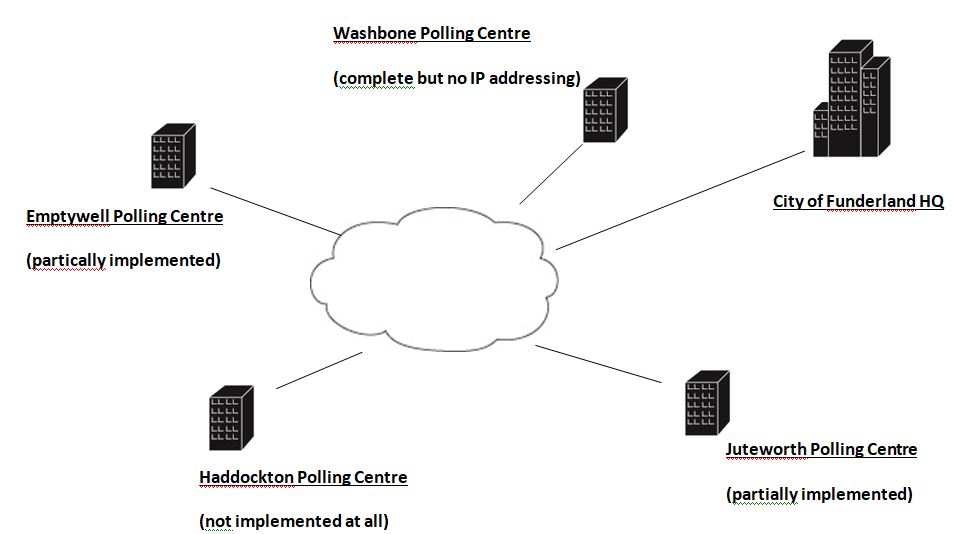
This means you will need to:
- add the appropriate network devices, cabling and sample workstations & servers to the unfinished areas of the network to cover the requirements below (within the limits of the capabilities of the Packet Tracer simulator), and then
- create an IPv4 addressing scheme to cover the whole design(together these are worth 15%). The plan should cover all sites so that there is enough addressing to go around all your network areas (you can stick to using the /24 (255.255.255.0) mask for each area. The departmental/subnet host requirements are set out in the table below:
|
Dept/Venue |
Haddockton |
Juteworth |
Emptywell |
Washbone |
|
Management |
2 |
5 |
2 |
6 |
|
Polling Station 1 |
12 |
15 |
10 |
40 |
|
Polling Station 2 |
10 |
15 |
10 |
n/a |
|
Polling Station 3 |
n/a |
15 |
20 |
n/a |
|
Security |
2 |
2 |
2 |
8 |
|
Data Servers |
2 |
2 |
2 |
5 |
Finally you should use your IP addressing plan to configure all the devices to show a completely running Packet Tracer simulationof the sites, remembering that:
- The ISP public area is already fully functional – no need to alter this.
- The Funderland HQ site can be assumed to be already fully functional. There is a “pingable” address of 9.9.9.9 within that site so you can test connectivity. The area service provider routers in the public area are running RIPv2 for connectivity to your areas.
This part is worth 10%.
d) Research into and discuss in your presentationthe pros and cons of adopting the new IPv6 routed protocol over the current IPv4. Should City of Funderland implement the newer protocol or not?You must conduct research so that you can support your reasoning – it’s not acceptable to be just what you think. You should have a slide at the end of your presentation that is a reference list of research you’ve conducted.(Worth 5%)
e) Look into the security aspects of the polling station sites – what would your company implement to ensure that polling data and voters privacy remains safe within the 4 polling station areas. Be as specific as possible as to where these features should go in your network design. Again, this needs to be discussed in your presentation.(Worth 5%)
f) Look into what security technologies could be implemented to protect the voter data as it passes across the ISPs public network area. What would your company be implementing and why? Discuss in your presentation.(Worth 5%)
g) Group SCRUM meetings and the final project retrospective meeting record (4 records in total) are worth 10%.
Live Presentation/’Pitch’
On Thursday 18th January, you will present as a group to an audience of two FUNDERLAND CITY COUNCIL officials (your tutors). The presentation will be scheduled to last 20 minutes only. During this presentation you must introduce your company and spend 2 or 3 minutes ‘selling your brand’ to us (i.e. give a bit of company information – remember the SE seminar preparation: Who are you in the world? What are you committed to? What can you be counted on for?). The remaining time is to present your solution to us.It is a good idea to customise your visuals according to your brand.
Your presentation/pitch should also be uploaded to CANVAS by Thursday 18th 8pm i.e. after you have given the pitch.
Bring with you to the presentation a print out of your peer reviewsheet – a copy of which is on CANVAS. We cannot assign marks if this is not completed and signed by every group member.