
TaskB.sh script

- Details
- Category: Level 1, System Administration (Linux BASH Script)
- Published: Thursday, 21 January 2021 14:45
- Hits: 887
Task B Menu
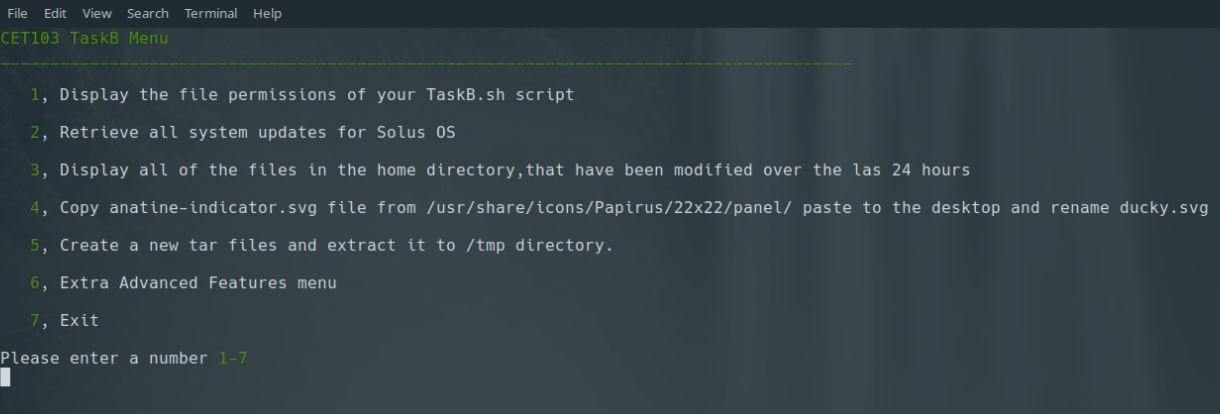
TaskB.sh script
#!/bin/bash
#TaskB.sh bash menu system
function showmenu { #Main Menu function
echo "$(tput setaf 2)CET103 TaskB Menu$(tput sgr 0)"
echo "$(tput setaf 2)______________________________________________________________________________________$(tput sgr 0)"
echo
echo ' ' "$(tput setaf 2)1$(tput sgr 0), Display the file permissions of your TaskB.sh script"
echo
echo ' ' "$(tput setaf 2)2$(tput sgr 0), Retrieve all system updates for Solus OS"
echo
echo ' ' "$(tput setaf 2)3$(tput sgr 0), Display all of the files in the home directory,that have been modified over the las 24 hours"
echo
echo ' ' "$(tput setaf 2)4$(tput sgr 0), Copy anatine-indicator.svg file from /usr/share/icons/Papirus/22x22/panel/ paste to the desktop and rename ducky.svg"
echo
echo ' ' "$(tput setaf 2)5$(tput sgr 0), Create a new tar files and extract it to /tmp directory."
echo
echo ' ' "$(tput setaf 2)6$(tput sgr 0), Extra Advanced Features menu"
echo
echo ' ' "$(tput setaf 2)7$(tput sgr 0), Exit"
echo
echo "Please enter a number $(tput setaf 2)1-7$(tput sgr 0)"
read OPTION #read user input
#statement for input validitation
if [ "$OPTION" == 1 ] || [ "$OPTION" == 2 ] || [ "$OPTION" == 3 ] || [ "$OPTION" == 4 ] || [ "$OPTION" == 5 ] || [ "$OPTION" == 6 ] || [ "$OPTION" == 7 ]; then
case $OPTION in #statement for user options
1)Option1;;
2)Option2;;
3)Option3;;
4)Option4;;
5)Option5;;
6)Option6;;
7)Option7;;
esac
else #error message handing
clear
echo "Invalid option entered. Please enter a number between 1-7?"
echo
showmenu
fi
}
function Option1 { #function for first option
clear
echo "$(tput setaf 2)Display the file permissions of your TaskB.sh script$(tput sgr 0)"
echo
echo "$(tput setaf 1)ls -l TaskB.sh$(tput sgr 0)"
echo
ls -l TaskB.sh
echo
read -t 10 -p "Press ENTER or wait ten seconds to go back to menu"
clear
showmenu
}
function Option2 { #function for second option
clear
echo "$(tput setaf 2)Retrieve all system updates for Solus OS$(tput sgr 0)"
echo
echo "$(tput setaf 1)sudo eopkg up$(tput sgr 0)"
echo
sudo eopkg up
echo
read -t 10 -p "Press ENTER or wait ten seconds to go back to menu"
clear
showmenu
}
function Option3 { #function for third option
clear
echo "$(tput setaf 2)Display all of the files in the home directory,that have been modified over the las 24 hours$(tput sgr 0)"
echo
echo "$(tput setaf 1)find . -mtime -1 -print | more$(tput sgr 0)"
echo
find . -mtime -1 -print | more
echo
read -t 10 -p "Press ENTER or wait ten seconds to go back to menu"
clear
showmenu
}
function Option4 { #function for fourth option
clear
echo "$(tput setaf 2)Copy anatine-indicator.svg file from /usr/share/icons/Papirus/22x22/panel/ paste to the desktop and rename ducky.svg$(tput sgr 0)"
echo
echo "Copy"
echo "$(tput setaf 1)cp /usr/share/icons/Papirus/22x22/panel/anatine-indicator.svg ~/Desktop/anatine-indicator.svg$(tput sgr 0)"
cp /usr/share/icons/Papirus/22x22/panel/anatine-indicator.svg ~/Desktop/anatine-indicator.svg
echo
echo "Rename"
echo "$(tput setaf 1)mv ~/Desktop/anatine-indicator.svg ~/Desktop/ducky.svg$(tput sgr 0)"
mv ~/Desktop/anatine-indicator.svg ~/Desktop/ducky.svg
echo
read -t 10 -p "Press ENTER or wait ten seconds to go back to menu"
clear
showmenu
}
function Option5 { #function for fifth option
clear
echo "$(tput setaf 2)Create a new tar files and extract it to /tmp directory.$(tput sgr 0)"
echo
echo "Create backup"
echo "$(tput setaf 1)tar --exclude=/home/bh23xw/.profile --exclude=/home/bh23xw/Templates -czf my_backup.tar.gz /home/bh23xw$(tput sgr 0)"
tar --exclude=/home/bh23xw/.profile --exclude=/home/bh23xw/Templates -czf my_backup.tar.gz /home/bh23xw
echo
read -t 10 -p "Successfully compressed! Press ENTER to continue or wait ten seconds"
clear
echo "Extract"
echo "$(tput setaf 1)tar -xf my_backup.tar.gz -C /tmp$(tput sgr 0)"
tar -xf my_backup.tar.gz -C /tmp
echo
read -t 10 -p "Successfully extracted! Press ENTER to continue or wait ten seconds"
echo
read -t 10 -p "Press ENTER or wait ten seconds to go back to menu"
clear
showmenu
}
function Option6 {
clear
AdvencedMenu
}
function AdvencedMenu { #Advanced sub menu
echo "$(tput setaf 2)Advanced Bash Menu$(tput sgr 0)"
echo "$(tput setaf 2)______________________________________________________________________________________$(tput sgr 0)"
echo
echo ' ' "$(tput setaf 2)1$(tput sgr 0), List mountable disks"
echo
echo ' ' "$(tput setaf 2)2$(tput sgr 0), Search all png images in the system and archive it to Desktop"
echo
echo ' ' "$(tput setaf 2)3$(tput sgr 0), Check the status of all the services and save to Desktop and display in terminal"
echo
echo ' ' "$(tput setaf 2)4$(tput sgr 0), Display total memory (including the swap)"
echo
echo ' ' "$(tput setaf 2)5$(tput sgr 0), Displays the file system disk space usage in human readable form"
echo
echo ' ' "$(tput setaf 2)6$(tput sgr 0), Displays user's BASH terminal prompt settings"
echo
echo ' ' "$(tput setaf 2)7$(tput sgr 0), Back to Main Menu"
echo
echo ' ' "$(tput setaf 2)8$(tput sgr 0), Exit"
echo
echo "Please enter a number $(tput setaf 2)1-8$(tput sgr 0)"
#read input to a variable (Option)
read OPTION
#id statement to input validation
if [ "$OPTION" == 1 ] || [ "$OPTION" == 2 ] || [ "$OPTION" == 3 ] || [ "$OPTION" == 4 ] || [ "$OPTION" == 5 ] || [ "$OPTION" == 6 ] || [ "$OPTION" == 7 ] || [ "$OPTION" == 8 ];
then
#case statement for functions
case $OPTION in
1)Advanced1;;
2)Advanced2;;
3)Advanced3;;
4)Advanced4;;
5)Advanced5;;
6)Advanced6;;
7)Advanced7;;
8)Option7;; #Exit to terminal
esac
else #error message handing
clear
echo "Invalid option entered. Please enter a number between 1-8?"
echo
AdvencedMenu
fi
}
function Advanced1 { #function to first advenced option
clear
echo "$(tput setaf 2)List mountable disks$(tput sgr 0)"
echo
echo "$(tput setaf 1)sudo fdisk -l$(tput sgr 0)"
sudo fdisk -l
echo
read -t 10 -p "Press ENTER or wait ten seconds to go back to menu"
clear
AdvencedMenu
}
function Advanced2 { #function to second advanced option
clear
echo "$(tput setaf 2)Search all png images in the system and archive it to desktop$(tput sgr 0)"
echo
echo "$(tput setaf 1)find / -name *.png -type f -print | xargs tar -czf ~/Desktop/images.tar.gz$(tput sgr 0)"
find / -name *.png -type f -print | xargs tar -czf ~/Desktop/images.tar.gz
echo
read -t 10 -p "Press ENTER or wait ten seconds to go back to menu"
clear
AdvencedMenu
}
function Advanced3 { #function to third advanced option
clear
echo "$(tput setaf 2)Check the status of all the services and save to Desktop and display in terminal$(tput sgr 0)"
echo
echo "$(tput setaf 1)systemctl status > ~/Desktop/services.txt$(tput sgr 0)"
echo "$(tput setaf 1)more ~/Desktop/services.txt$(tput sgr 0)"
systemctl status > ~/Desktop/services.txt
more ~/Desktop/services.txt
echo
read -t 10 -p "Press ENTER or wait ten seconds to go back to menu"
clear
AdvencedMenu
}
function Advanced4 { #function to fourth advanced option
clear
echo "$(tput setaf 2)Display total memory (including the swap)$(tput sgr 0)"
echo
echo "$(tput setaf 1)free -t$(tput sgr 0)"
echo
free -t
echo
read -t 10 -p "Press ENTER or wait ten seconds to go back to menu"
clear
AdvencedMenu
}
function Advanced5 { #function to fifth advanced option
clear
echo "$(tput setaf 2)Displays the file system disk space usage in human readable form$(tput sgr 0)"
echo
echo "$(tput setaf 1)df -h$(tput sgr 0)"
echo
df -h
echo
read -t 10 -p "Press ENTER or wait ten seconds to go back to menu"
clear
AdvencedMenu
}
function Advanced6 { #function to sixth advanced option
clear
echo "$(tput setaf 2)Displays user's BASH terminal prompt settings$(tput sgr 0)"
echo
echo "$(tput setaf 1)grep -iw --colour=always "PS1=" ~/.bashrc$(tput sgr 0)"
echo
grep -iw --colour=always "PS1=" ~/.bashrc
echo
read -t 10 -p "Press ENTER or wait ten seconds to go back to menu"
clear
AdvencedMenu
}
function Advanced7 { #function to seventh advanced option, back to main menu
clear
showmenu
}
function Option7 { #exit from bash with validitation
clear
echo "$(tput setaf 2)EXIT$(tput sgr 0)"
echo "$(tput setaf 2)---------------------------$(tput sgr 0)"
echo
echo "Would you like to EXIT? $(tput setaf 2)(Y/N)$(tput sgr 0) "
echo
read E
if [ "$E" == N ] || [ "$E" == Y ]; then
case $E in
Y)Yes;;
N)No;;
esac
else
clear
echo "Invalid value. Please try again"
echo
Option7
fi
}
function Yes {
clear
exit
}
function No {
clear
showmenu
}
#display Main Menu on first time
clear
showmenu