CET212 Advanced Software Development PPW2 Task and Submission

- Details
- Category: Level 2, Advanced Software Development
- Published: Monday, 25 January 2021 15:32
- Hits: 821
Task
CET212 Advanced Software Development Assignment (2018/19)
This assignment contributes 70% to your final module mark and tests learning outcomes 2, 3 & 4.
Part B - Professional Practice Week 2
Deadline: Thursday 23rd May 2019, 12:00pm via Canvas
This assignment is split into two parts. Part A (worth 35 marks) is a design & reporting task, which will be carried out during Professional Practice Week 1 and culminates in the creation of a UML diagram and design rationale.
Part B (worth 65 marks) will be carried out during Professional Practice Week 2.
You are expected to spend around 20 hours on this part of the assignment.
Scenario
You are working as a consultant to a local authority IT department. You have been tasked with developing a C# system to manage air particulate sensor records (in micrograms per cubic metre, μg/m3) for various locations across the authority. Each set of readings for a single location will be submitted as an XML data file according to a standardised structure (see later), containing location and reading dates together with the noon particulate reading (μg/m3), temperature (in degree Celsius) and relative humidity (as a %) for each date at the location. Your system will be required to read and process the XML files for all locations of interest in order to determine total particulates for a given location, total particulates across all locations on each date and to find out which location has the largest individual particulates reading. A significant number of locations will be submitted and it is important that the authority is able to process the data quickly so that they can identify particulate hot-spots when necessary. Therefore, a multi-threaded system that can process multiple files concurrently will be required.
Ultimately, the intention is for the system to be made available as a client-server application but your task has been simplified. You are required to develop a prototype application that will run on a standalone PC but you should make use of separation of concerns so that the job of transferring the application to the local authority’s client-server environment in the future will be possible with minimum adjustments to your code.
An example XML file showing the structure of the data is provided below:
<?xml version="1.0" encoding="utf-8" ?>
<Particulates>
<Location name="Quayside">
<Reading date="18/02/2019">
<value>13</value>
<temperature>8.0</temperature>
<humidity>51.5</humidity>
</Reading>
<Reading date="19/02/2019">
<value>21</value>
<temperature>11.4</temperature>
<humidity>55.0</humidity>
</Reading>
</Location>
</Particulates>
This XML file represents the data for a location called Quayside, with a reading taken 18th February 2019 of 13 μg/m3 with temperature of 8.0oC and Humidity of 51.5% plus another reading 19th February 2019 of 21 μg/m3 with temperature of 11.4oC and Humidity of 55.0%.
The data for each location will be stored in a separate file and each location may have any number of date readings recorded, which will be on different dates in the same file.
You have been tasked with designing this application as a multi-threaded windows application, making use of the Producer/Consumer pattern and LINQ query language. You have been given the following list of functional requirements for the system:
- Select and queue the processing of multiple XML files.
- Merge the data from multiple XML files and carry out the necessary processing in order to generate the following output reports (via display on a Windows Form):
- A list of locations, with the ability to select and view details of all readings for a selected location (including the date, particulates value, temperature and humidity readings)
- A list of locations, sorted alphabetically, with the total particulates across all date readings for that location
- A list of dates, with the total recorded particulates values (across all locations), sorted by date
- The largest individual particulates value recorded by the system (the location, date and highest recorded particulates value across all amalgamated files)
Professional Practice Week 2 – Implementation and Testing Task
C# Application (45 marks)
Implement the system described in the scenario above as a C# forms application using Visual Studio (version VS2017). You should apply ALL the coding conventions used in the module including naming, layout and commenting: Marks will be explicitly awarded on this and poor presentation may adversely affect marks for other aspects if it obscures the correctness of otherwise satisfactory code.
Your application should be multi-threaded, making use of the Producer/Consumer pattern and should be make use of Windows Forms, designed with an interface suitable for users with limited computing experience. Your program should demonstrate the use of multiple producers and consumers, with an appropriately sized queue.
You should include any example XML files (placed in the bin/debug folder of your project) used in the testing of your application.
Appropriate exception/error handling should be included to ensure that the application is robust.
Unit Testing (15 marks)
Create appropriate unit tests, using the Microsoft Testing Framework, to automate the testing of one aspect of the functionality of your application. You are given the freedom to choose which aspect of your system to demonstrate unit testing but this must include at least the automated unit testing of TWO distinct methods. These automated unit tests must be properly integrated into your overall Visual Studio Solution (through the Microsoft Testing Framework) and be fully separated from the production code (not embedded within it). This will most likely require additional “fake” and/or “mock” classes to be provided within the test project so that isolation testing can be achieved. All unit test code must be subjected to the same level of quality (code structure, naming standards and commenting) as would be expected within your production code.
Recorded Screencast (5 marks)
You are required to provide a recorded screencast, demonstrating the running of your system (including all functionality) from a user perspective and evidence that your automated unit testing is working. This screencast may be created using any suitable screen recording software e.g. Camstudio and saved in a format that can be viewed on a Windows machine e.g. .avi, *.mp4 or .wmv. A copy of Camstudio Portable can be downloaded from the F drive and run from either your H drive or a USB portable device.
Submission
Your submission should be provided as a single zipfile containing the following:
- The complete folder structure for the Visual C# solution (version VS2017), containing the projects for both your application and unit tests.
- Your screencast, which should be included in the zipfile along with your Visual Studio solution and clearly named so that it can be easily identified.
The zipfile should be uploaded to Canvas by the specified hand-in date, using the assignment submit link for Part B provided in the assessment area.
Submission Date: Thursday 23rd May 2019, 12:00pm via Canvas.
Marking Criteria
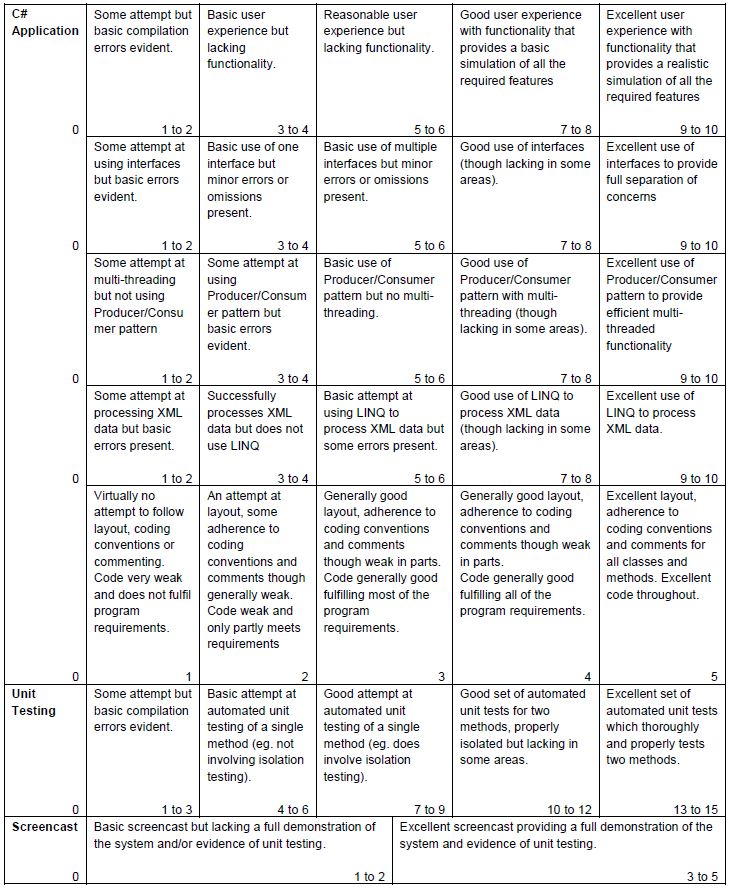
Assignment Part B (PPW2) will contribute 65 marks to the overall assignment mark
Submission
C# Application + Unit Testing
Recorded Screencast