CET244 (Web A.D) PPW1 Task and Submission

- Details
- Category: Level 2, Web Application Development
- Published: Tuesday, 02 February 2021 10:08
- Hits: 880
Task
CET244 Professional Practice Week 1
We envisage this assessment will take a maximum of 18 hours to complete.
Hand in by 1pm on Wednesday 6th March 2019 via canvas
You are being assessed on the following learning outcomes:
Knowledge
1. Appreciate the importance and context of UXD in the development of a modern web
application
2. Comparative knowledge of design and development techniques in web application
development
Skills
1. Create and configure data driven web applications using a web framework
2. The ability to plan, develop and implement an integrated testing and evaluation
strategy accounting for user experience, data integrity and performance issues using
relevant web platform tools
Scenario
You recently applied for an internship with a web development company and you were
offered the position.
The role was advertised as a junior full stack web developer and requires you to work across
a range of tools and technologies to build web applications.
As part of your induction, you’ve been placed in the front-end developer team, where you will
work on rapid prototyping and some front end development using HTML, CSS, JavaScript
and the ReactJS framework.
Task 1: Prototype using Figma
In your welcome pack, you noticed that employees can take out a small cash loan for up to
£4000 and pay back monthly for up to 3 years. Compound interest is charged at 2%.
In a coffee break, a colleague mentions that staff often use these loans to purchase
computers, smartphones, games consoles and other IT equipment for home use.
Since the company is exploring the use of Figma as a rapid prototyping tool, and have asked
you to pull together a mock-up application to demonstrate to colleagues, you decide to
create a mock-up loan calculator application , that makes it easy for staff to calculate the
interest on a loan, so they can understand the amount of loan they can afford.
A user will need to enter the following information:
- Loan Amount (required)
- Loan Duration (required, this can be months or years)
If any of the required information is not entered, a user will be shown an error message "This
is a required field"
On entering, the correct values and clicking/tapping the calculate button, the user will be
shown the monthly payment, total loan amount repayable and total interest repayable.
Use Figma to create a high fidelity, responsive web app for the staff loan calculator. Show all
routes through the application.
Task 2: JavaScript with ES6
A colleague in the front-end team has sent you an email:
Hi
Great to have you on board!
As you know, we’ve just started using JavaScript (ES6 syntax)
together with Babel and React for all new web projects. I remember
in your interview, you mentioned that you’ve been exploring
JavaScript using ES6 and would like to get more experience working
with the language. You discussed some of the enhancements to the
language including var, let and const, arrow functions, the spread
operator and classes. All good stuff.
We’re creating a video bookmark application at the moment. Users
will be able to save YouTube URLs via a responsive web form. We’ll
save this in a database and provide features for a user to view
the videos in a variety of ways.. Sort by rating, date order, star
rating etc.
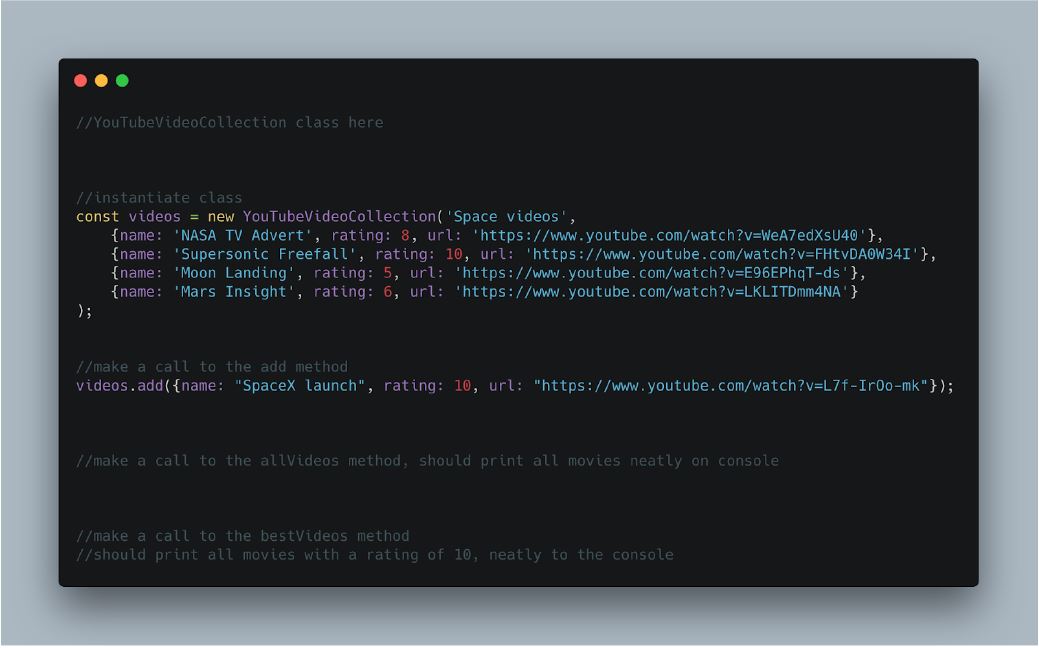
Anyway, its early days, but could you create some ES6 code.. A
colleague has already started the work and added comments. Take a
look at the attached JS file and have a go at adding in the class
definition, constructor and methods. We’re just working on the
console at the moment.
Task 3: ReactJS components
A colleague in the front-end team has sent you an email:
Hi
Thanks for the work you’ve done so far.
As you know, most of our clients typically provide requirements as
features or user stories, and we work closely with them to get a
solid understanding of what they want. Once we’ve broken these
down into manageable tasks, these are then allocated across the
teams. Sometimes we’ll allocate tasks to a specific developer,
sometimes you can choose which tasks you take on. We’re quite
flexible. During the daily stand-up, you can talk through what
you’ve achieved, what you’re working on and any issues/problems.
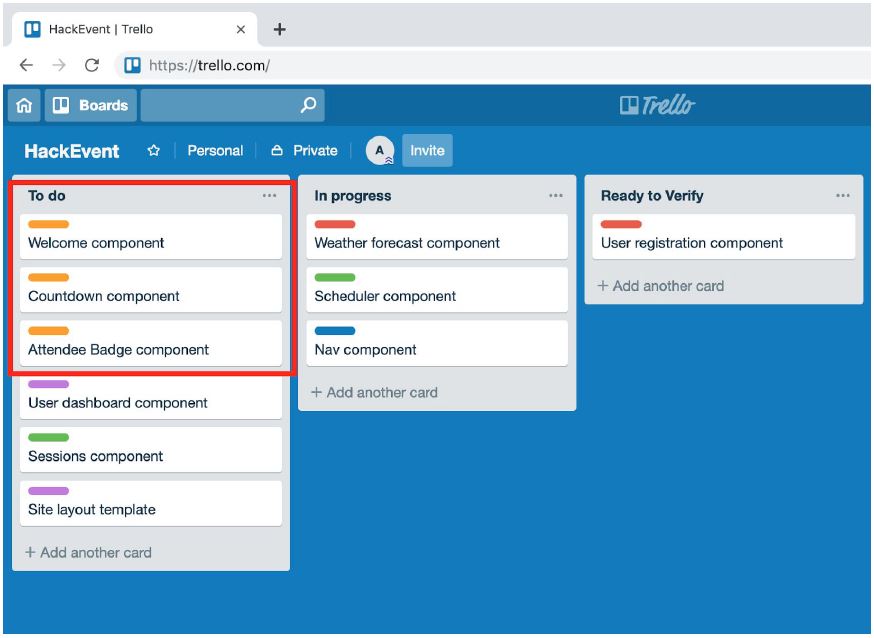
The team uses a Trello board for each project, to keep track of
development work and keep everyone updated.
So, one project I’d like you to get involved with is our
HackEvent. On July 4th we want to run a one day conference for
developers, with presentations and hands-on workshops. We thought
it would be a good opportunity to use ReactJS to build the
conference site.
I know you’ve been looking at creating components with ReactJS, so
I’ve invited you to the ‘HackEvent’ board and allocated you three
tasks:
Component 1: Welcome component (welcome.html)
Develop a ReactJS component that displays a welcome message:
A call using:
<Welcome name="Andrew" />
should output:
<div>Welcome to HackEvent 2019 Andrew</div>
Use a React style object to set the typeface to Arial and font size 16px
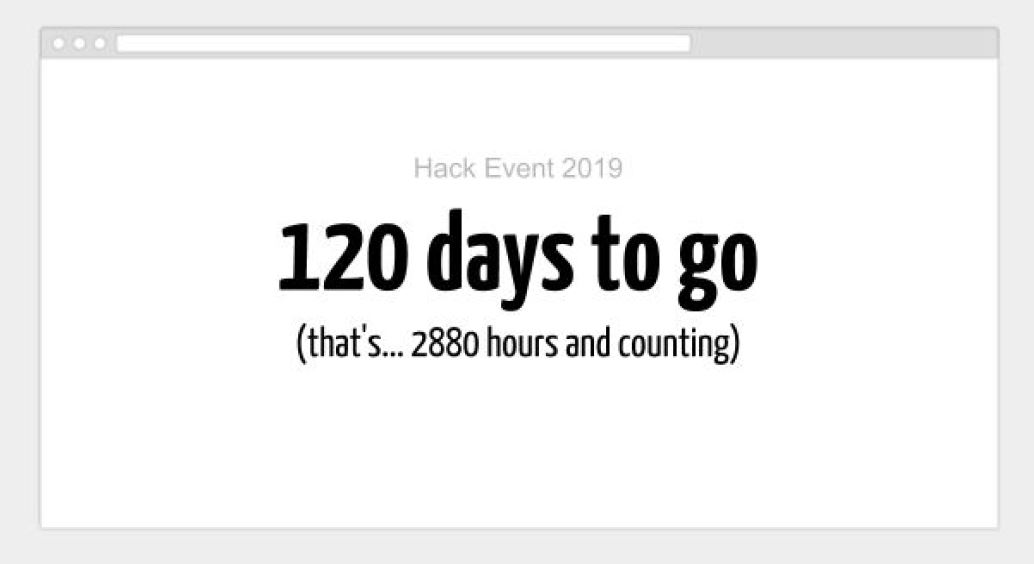
Component 2 - Event countdown component (event.html)
Create a ReactJS component that displays how many days until the event.
The event is due to take place on July 4th 2019.
The call should look like this:
<CountDownTimerToEvent />
We plan on using this component full screen on the homepage, while we develop the site.
Use a style object and Google Font - Yanone Kaffeesatz.
https://fonts.google.com/specimen/Yanone+Kaffeesatz
Make it full screen and update automatically.
Component 3 - Attendee badge component (badge.html)
When people register for the event we’ll capture their name, email, job title and allocate a
role (i.e. attendee, volunteer or presenter)
Attendees get a purple badge, volunteers an orange badge and presenters a green one.
We’re not sure what the badges will look like yet, but we’d like you to create a badge
component that displays an attractive mock-up. So if we call:
<conferenceBadge name="Joe Bloggs" job="JS Developer" role="attendee" />
It will display a mockup of the badge. Use multiple classes for the component.
A quick google image search for conference badges, throws up lots of examples..
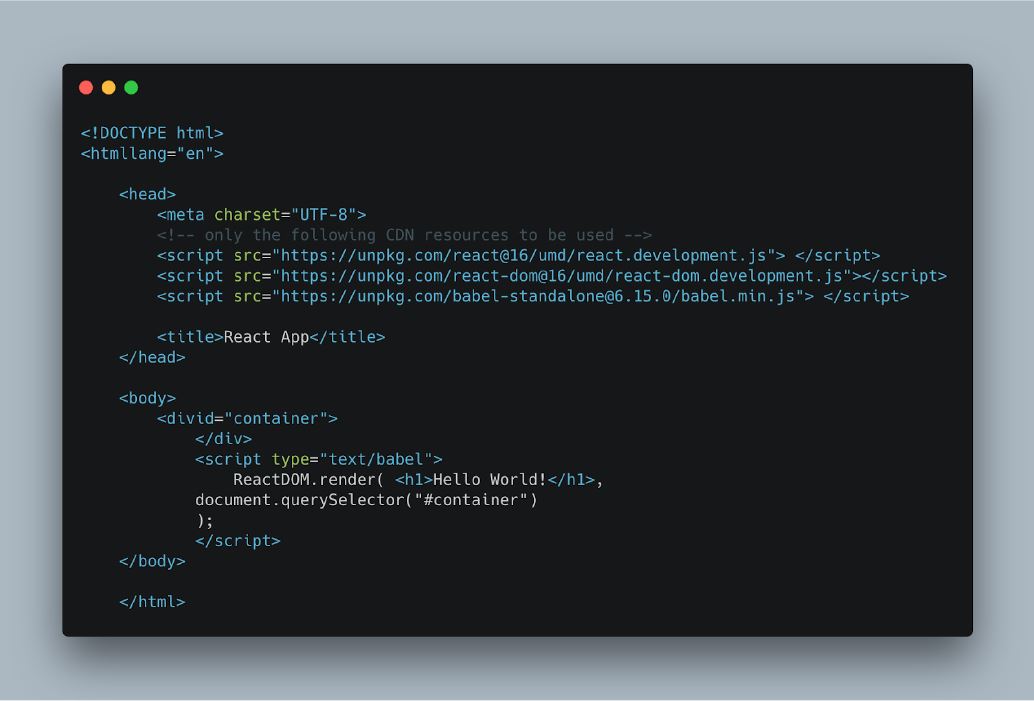
Use the following template for creating your components:
Create a seperate page for each
- welcome.html
- event.html
- badge.html
What to submit
Create a folder called cet244-ppw1
Inside the cet244-ppw1 folder create three more folders: task1 , task2 and task3
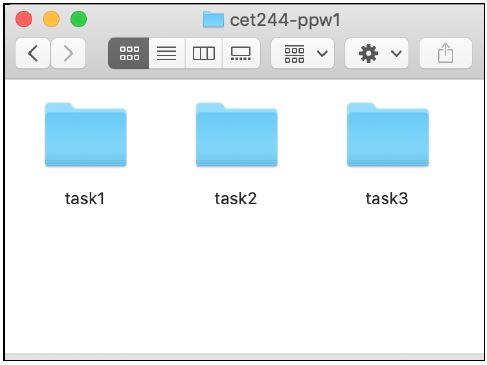
Inside the task1 folder add:
- a screencast of your prototype running in Figma - show design and prototype mode
- URL to your Figma design (use the share button in figma)
Inside the task2 folder add:
- A single javascript file called youtube.js
(the file will be tested by running node youtube.js)
Inside the task3 folder add:
- welcome.html
- event.html
- Badge.html
ZIP the cet244-ppw1 folder and submit to canvas.
Feedback and marks
This assessment is worth 30% of the module mark.
Work will be marked and returned to you by the 3rd April 2019. You will receive a feedback
sheet and mark out of 100.
Core tasks allocated in the lab (5%)
Task 1 (25%)
The work will be assessed by reviewing the screencast and your design in the browser.
Marks will be allocated for overall design of UI, functionality achieved using Figma and asset
management
Task 2 (20%)
The work will be assessed using node on the command line.
Marks will be allocated for code layout/comments, functionality and use of ES6 constructs
Task 3
The work will be assessed by reviewing the three HTML files in a Chrome web browser and
exploring the code using Visual Studio Code/Web Browser developer tools.
Any additional assets such as images should be included locally in the task3 folder.
Marks will be allocated for code layout, comments, functionality, layout/design and use of
ReactJS
Task 3a (10%)
Task 3b (20%)
Task 3c (20%)
Submission