
CET324 (Advanced C.S) PPW2 Task and Submission

- Details
- Category: Level 3, Advanced Cyber Security
- Published: Wednesday, 03 February 2021 19:14
- Hits: 1452
Task
CET324 – Advanced CyberSecurity
Assignment 2 of 2
The following learning outcomes will be assessed:
Knowledge
1. Critical understanding of the principles and applications of cybersecurity and secure systems design and the technical, legal and business issues involved in developing and implementing secure systems taking into account the potential security threats, risks and attacks.
2. Critical analysis of the tradeoffs of balancing the range of key security properties taking into account the concepts of trust and trustworthiness in cybersecurity.
Skills
1. Application of the principles and techniques from Computer Science to deal with the complex issues involved in effectively designing and implementing computer systems whilst identifying and minimising the security risks, effectively implementing a reliable and effective security protocols and identify suitable metrics to quantify and measure levels of security.
2. Analysis and evaluation of the professional requirements of a cybersecurity practitioner, and critically discuss the challenges facing the cybersecurity practitioner.
Important Information
You are required to submit your work within the bounds of the University Infringement of Assessment Regulations (see your Programme Guide). Plagiarism, paraphrasing and downloading large amounts of information from external sources, will not be tolerated and will be dealt with severely. Although you should make full use of any source material, which would normally be an occasional sentence and/or paragraph (referenced) followed by your own critical analysis/evaluation. You will receive no marks for work that is not your own. Your work may be subject to checks for originality which can include use of an electronic plagiarism detection service.
For this assessment you are asked to submit an individual piece of work, therefore the work must be entirely your own. The safety of your assessments is your responsibility. You must not permit another student access to your work.
Referencing for this assessment should be done using the Harvard referencing system. (See your Programme Guide).
Please ensure that you retain a duplicate of your assignment. We are required to send samples of student work to the external examiners for moderation purposes. It will also safeguard in the unlikely event of your work going astray.
| Submission Date and Time | Wednesday 22nd May 2020 by 17:00 local time |
| Submission Location | Digital copy via Canvas |
| Document Format | You are required to submit the following three files: 1. A zip file containing the full system source code file named “studentID_system_source_code.zip”. 2. A Microsoft word document named “studentID_reflective_report.docx” 3. A Screen cast--compatible with windows media player, or similar software-- named studentID_screencast. Replace “studentID” with your university student ID. Submit the file in the allocated assignment submission windows on Canvas. |
| Maximum hours to complete | No time set due to Covid-19 crises. |
| Assignment weight | 60% |
| Other requirements | You must adhere to the above assessment requirements. Your software will checked for plagiarism using Pycode, JPlag, MOSS or other open source software code similarity checker. |
Assignment Specification
Part 1 (70 marks)
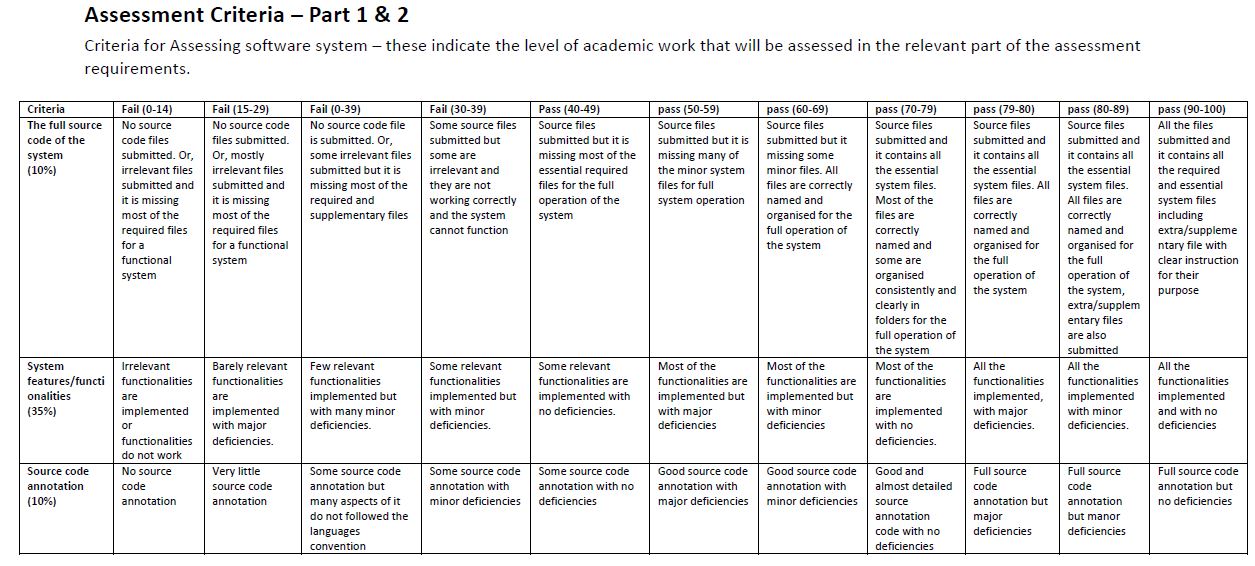
Produce a programme (using suitable web programming languages and technologies) to develop a prototype system which illustrates appropriate design of security systems and the application of programming principles to cybersecurity systems. You should adapt concepts and principles of secure programming and safe coding in your system development.
Your system should contain the following features/functionalities as minimum:
System features/functionalities
1. A user friendly (accessible, usable and robust to errors) graphical user interface to prompt users to register on the system by providing the following personal details:
a. full name,
b. email address and
c. password.
2. The system should algorithmically determine the following:
a. The validity of the email address.
b. The strength of the chosen password.
3. The system should classify user password as ‘weak’, ‘medium’ or ‘strong’.
4. The system should provide suitable textual recommendation to users to strengthen their password only if their chosen password is classified as ‘weak’ or ‘medium’.
5. The system should help users to recover from errors, for example users entering invalid input.
6. The system should be designed to be secured against web-based attacks, such as SQL injection.
7. The system should include at least five security checking features. You are required to identify appropriate features that enhance the security of your system. For example, prevent users from reusing previously chosen password, use encryption algorithm to encrypt user data etc.
8. Include multifactor authentication feature. For this work you are allowed to use the provided email address by the user to send a one-time use code.
System source code annotation
• You should annotate and document your system source code following the correct source code documentation and programming convention for your selected programming language(s).
System screen cast
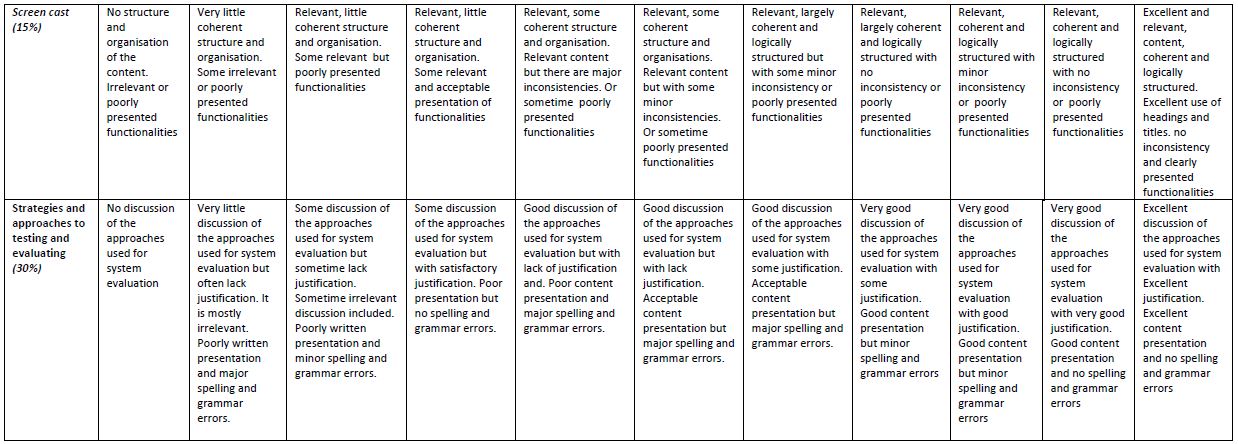
• You are required to create a screen cast showing the full functionality of your developed system. The screen cast should be between 5 to 10 minutes. You show parts of your code with respect to different functionality of your system.
Part 2 (30 marks)
You are required to write a report (approximately 1000 words) containing the following:
• A critical discussion of your chosen approaches for examining the strengths and weaknesses of your system.
o Describe your chosen strategies and approaches to testing and evaluating the different functionalities for your system.
o Provide an appendix at the end of the report to include the following:
▪ Clear and easy to read/view screenshots of all the implemented features and functionalities of the system.
▪ For each screenshot you must provide the following:
• Appropriate text title to state the feature of the system the screenshot represent.
• A short paragraph to describe the content of the screenshot and reference to snippet of programming code in your system related to the content of the screenshot. The reference to the programming code could be by giving the full path to the source code file that contains the code for the screenshot.
Submission
Video
Reflective Report
Report
Strengths and weaknesses of the system
The system has all user input fields authenticated on the client side, which allows you to require the user to fill out form fields. It also checks that the values entered match the pattern defined in the system, so this type of check allows you to check the predictable strings (email addresses). It also allows you to compare the password with the value entered in the password field to confirm that you are entering the correct password to avoid entering the wrong password. (Marla, 2012)
On the server side, to prevent SQL injection, passwords are stored in encrypted form in the database, which has the advantage of not being stolen, but care must be taken that the password required for encryption, which is required to encrypt and decrypt the password, is not accessible or lost. (Vandersteen, 2020) In an SQL query, the embedding of user inputs in an SQL statement is prevented by the AddWithValue method, so that it is not treated as a statement but placed at the end of the statement as a string variable. The advantage of this is that they thus confirm the code and cannot access the data (Durano, 2019).
The system informs the user of the strength of the user's password so that the password cannot be guessed and thus the user's data remains secure. The strength of the password is determined by the use of numbers, lowercase and uppercase letters, and various characters and its length. (Five algorithms to measure real password strength | Nulab, 2016).
System security also includes changing the password every 30 days; if the user's password is older than 30 days, it redirects the user to the update page to change their password. The other is that when the password is changed, the old password is saved for a year, thus preventing the password from being reused, which ensures that the user’s data remains secure and cannot be accessed by unauthorized persons.
The user has the option to reset the forgotten password. A temporary password will be sent to the user's registered email address, which must be used within 24 hours. The temporary password is stored in the TempPassword database. So this way the user has the option to log in with his old password as well. When the user logs in, the system checks in the database whether the user logs in with the temporary or old password. Using the temporary password, the user is redirected to the Update page to change the temporary password, once this is done the temporary password is deleted from the database, so the password can no longer be used.
The system uses a unique index to help maintain data integrity to ensure that the data set in the table does not have the same key value, thus validating the individuality of the data values. In the Users table, a UNIQE key has been assigned to the email_address field, which has the advantage of preventing the email address from being used more than once. (Difference between Primary key and Unique key - GeeksforGeeks, 2020)
One of the weaknesses of the system is that only one simulation is not real and it is in Web.config.
The user is informed of everything to avoid the possibility of errors, so that the system can operate securely to protect the data. During the development of the system, all known attacks on the server and client side were excluded.
Strategy and approach to the different functions of the system.
I used the Rapid Application Development Methodology (RAD) method to build the system. This is an Agile project management strategy that allows us to implement a smaller project in a short time. So creating in a fast-paced environment minimizes the design phase while maximizing prototype development. The (RAD) consists of four main phases: Requirements planning, User design, Rapid construction and Cutover. (Powell-Morse, 2016)
First of all, the goals of the project and its expectations were defined. Features / functions of the system included a user-friendly graphical user interface that prompts users to register in the system, which required the following personal information, full name, email address and password. The system had to algorithmically determine the validity of the email address and the strength of the password. Passwords had to be categorized into different categories as weak, medium, and strong to help the system inform the user to enter the correct password. The system must be secure against web-based attacks, i.e., SQL injection, and include five security check features, such as preventing users from reusing the previous password or using an encryption algorithm to protect the data. As a final step in this section, the system had to include the multi-factor authentication function and use the provided email address by the user to send the onetime use code.
I used Rapid development method and during the development process, during the testing, the operation of all functions was checked. Then all functions were retested by entering values, enabled and not enabled, by entering values.
User input fields
Each of the user input fields was checked so that I entered incomplete or incorrect data into the input fields, as a result of which the system warns that for any deficiencies, such as entering the full name, the value of the e-mail address was incorrect or was used, I entered an incorrect value when confirming the password. However, if the input fields are filled in correctly, you will continue to the login page without an error message.
SQL injection prevention
Encrypt passwords
Testing your password encryption, after entering the entered value, checked in the database what value you returned. The test result was positive because they were stored in encrypted form in the database.
Validity of the 30-day use of the Password
From the time the password was created, the password can only be used for 30 days, the date of registration was first checked in the database, as it is important that it returns the exact date and time. The date was then changed in the database to check if the system warned you to use a password older than 30 days. The result was successful because you were redirected to the Update page to change your passwords.
Prevent password reuse
When you change the password, the system moves the old password to the OldPassword table, which cannot be reused for 1 year. The following were tested
- The old password is transferred to the OldPassword table
- The old password is removed from the Password table
- For password reuse older than one year, reuse is not allowed
- Warning that the password has already been used.
The points mentioned above worked flawlessly during testing.
Replace a forgotten password
When replacing a forgotten password by entering the registered e-mail address on the Reset page, the following were tested:
- The temporary password is received at the e-mail address
- The temporary password has been added to the TempPassword database
- Log in with the old password until the temporary password is used
- If you are using a temporary password, redirect the system to the Update page
- When replacing the temporary password, whether to delete it from the TempPassword database
- And whether the new password appears in the Password database
Testing the points listed above, all worked flawlessly.
Prevent email address from being used more than once
In the Users table, a UNIQE key has been assigned to the email_address field, which prevents the email address from being used more than once. During testing, I tried to use the password that had already been used once on the registry page, as a result of which I was informed with an error message that “There is an error in form or email address already used! Please try again? ” So multiple use of the email address was prevented and testing was successful.
References
Durano, V., 2019. Protect Your Data: Prevent SQL Injection. [online] C-sharpcorner.com. Available at: <https://www.c-sharpcorner.com/article/protect-your-data-prevent-sql-injection/> [Accessed 19 May 2020].
GeeksforGeeks. 2020. Difference Between Primary Key And Unique Key - Geeksforgeeks. [online] Available at: <https://www.geeksforgeeks.org/difference-between-primary-key-and-unique-key/> [Accessed 19 May 2020].
Marla, S., 2012. ASP.NET Validation Controls. [online] C-sharpcorner.com. Available at: <https://www.c-sharpcorner.com/UploadFile/SukeshMarla/Asp-Net-validation-control/> [Accessed 19 May 2020].
Nulab. 2016. Five Algorithms To Measure Real Password Strength | Nulab. [online] Available at: <https://nulab.com/blog/tech/password-strength/> [Accessed 19 May 2020].
Powell-Morse, A., 2016. What Is Rapid Application Development (RAD) And How Do You Use It?. [online] Airbrake Blog. Available at: <https://airbrake.io/blog/sdlc/rapid-application-development> [Accessed 19 May 2020].
Vandersteen, J., 2020. The Disadvantages Of Encrypted Files. [online] It Still Works. Available at: <https://itstillworks.com/disadvantages-encrypted-files-2597.html> [Accessed 19 May 2020].
Appendices
Main Page (Default.aspx)
The Main Page here has two buttons that take you to the login or register page.

1Fig. Main Page
This is Main Page (Default.aspx.cs).

2Fig. Default.aspx.cs
Register Form (Register.aspx)
On the Register Form page, register by entering the full name, Email, Password and Confirm Password.
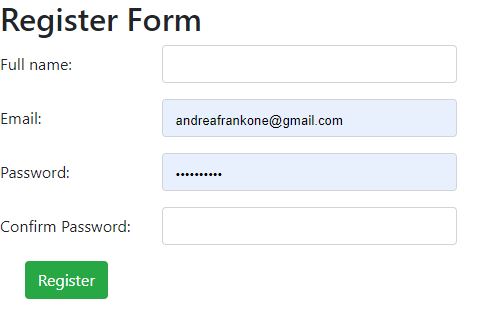
3Fig. Register Form
Full name input field, authenticated.
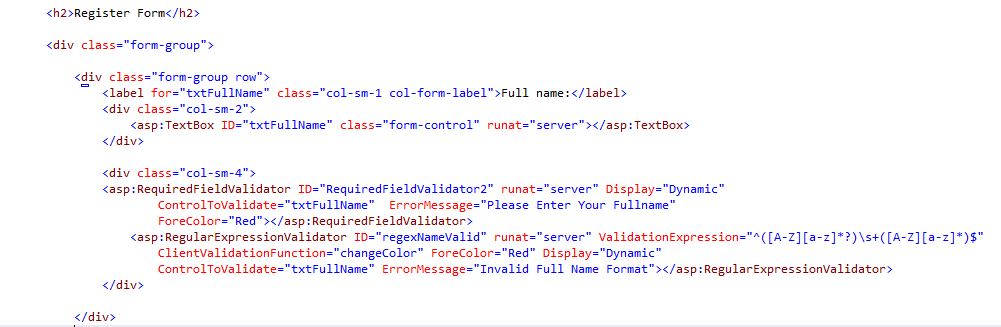
4Fig. Full Name
Email input field has been authenticated.
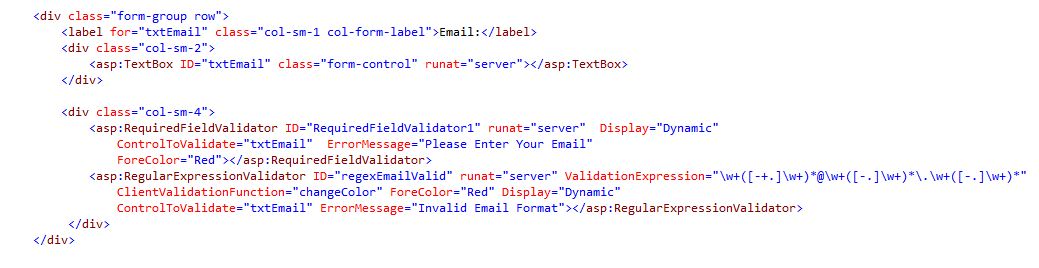
5Fig. Email
The Password input field has been authenticated.
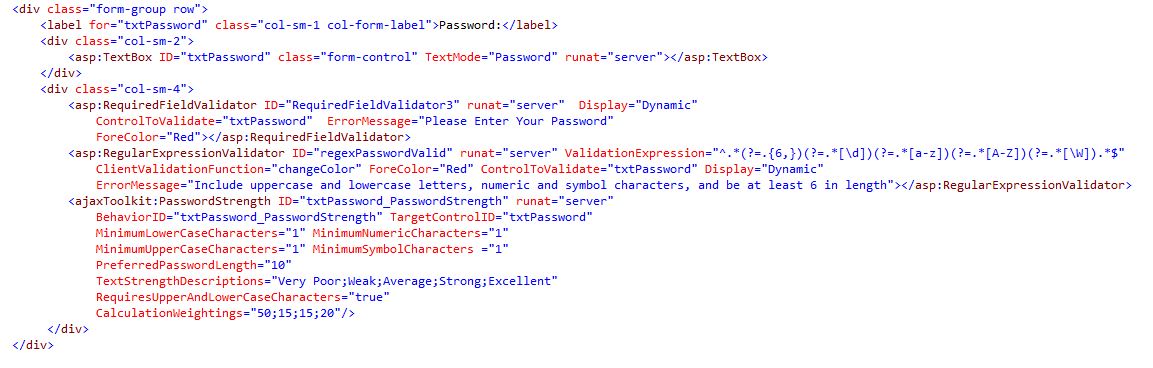
6Fig.Password
The Confirm Password input field has been authenticated.
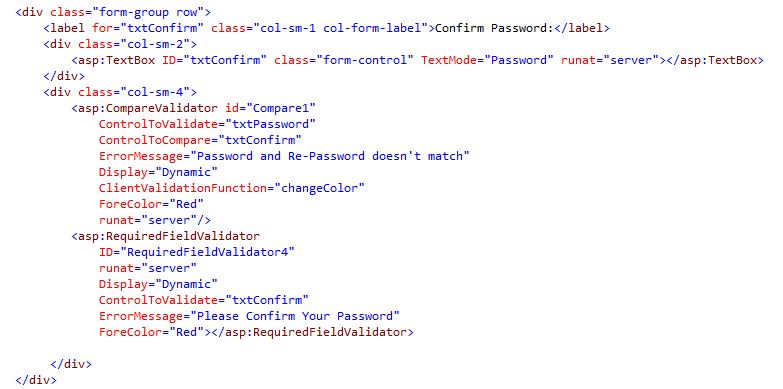
7Fig.Confirm Password
Login Form (Login.aspx)
On the Login form page, you can access the page by entering your e-mail and password. In addition, password update and reset are possible.

8Fig. Login Page
Login Form (Login.aspx.cs) Shows the code encryption, Check main password table first.
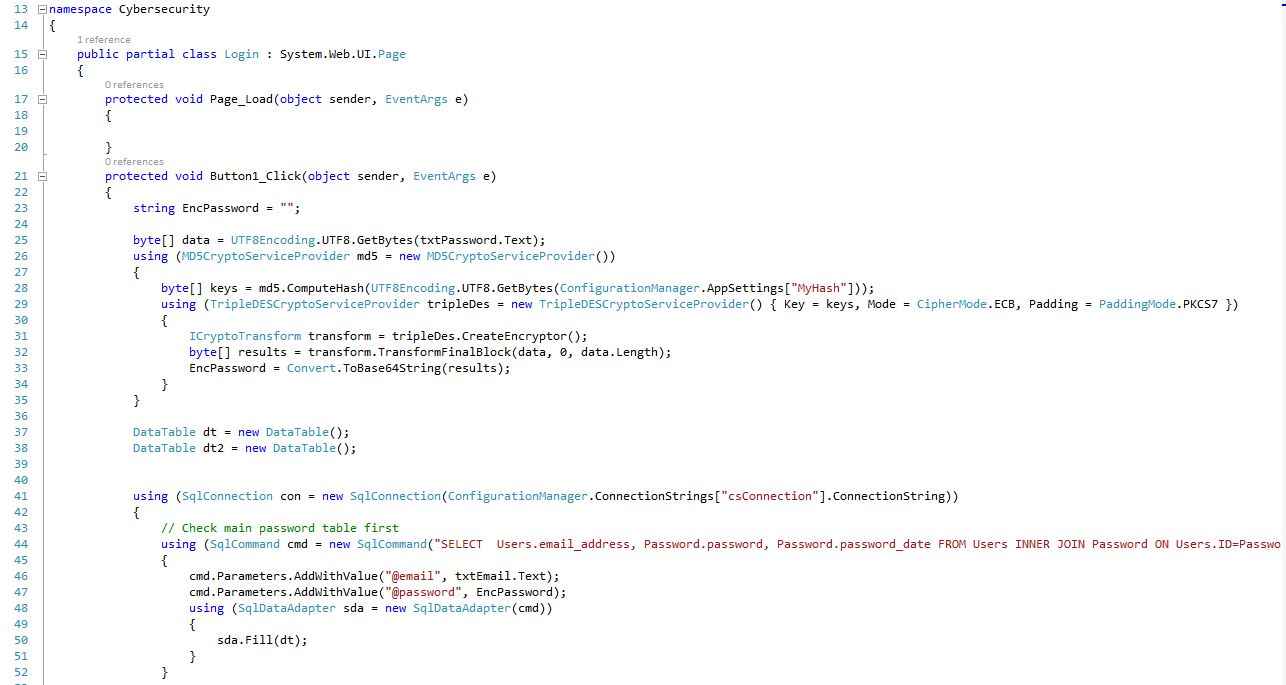
9Fig.Login Form code 3/1 (server side)
Login Form (Login.aspx.cs) Shows: Check main password table first, Then check temp password table for reset, Main password match, Check password not older than a month, Display dialog and redirect to update page, Set user state to logged in session, Temp password match, Check password not older than 24h, Set user state to logged out in session.
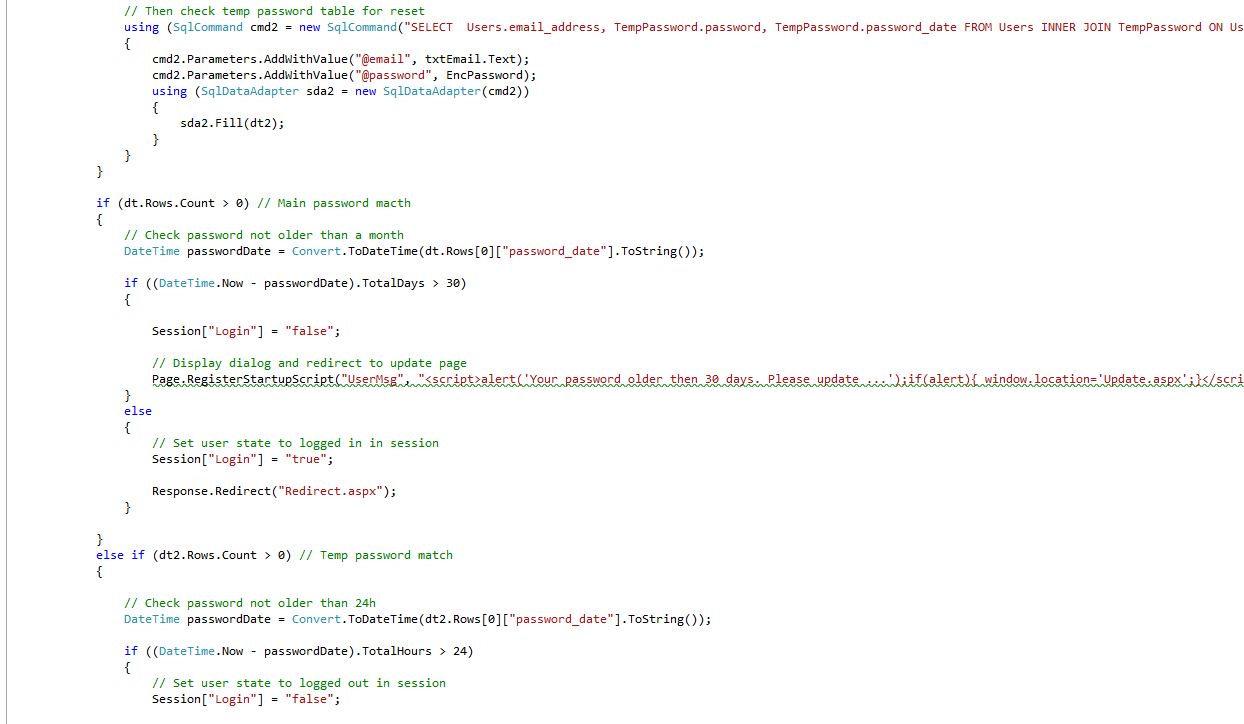
10Fig. Login Form code 3/2 (server side)
Login Form (Login.aspx.cs) Shows: Set user state to logged out in session, Display dialog and redirect to update page, Set user state to logged out in session.
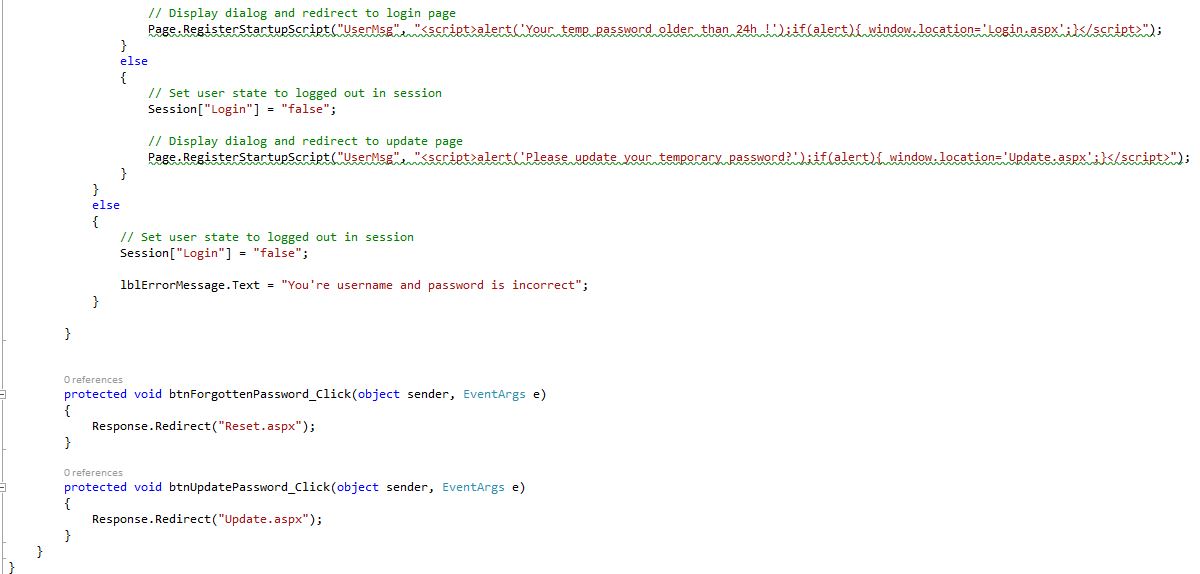
11Fig. Login Form code 3/3(server side)
Login Form (Login.aspx)
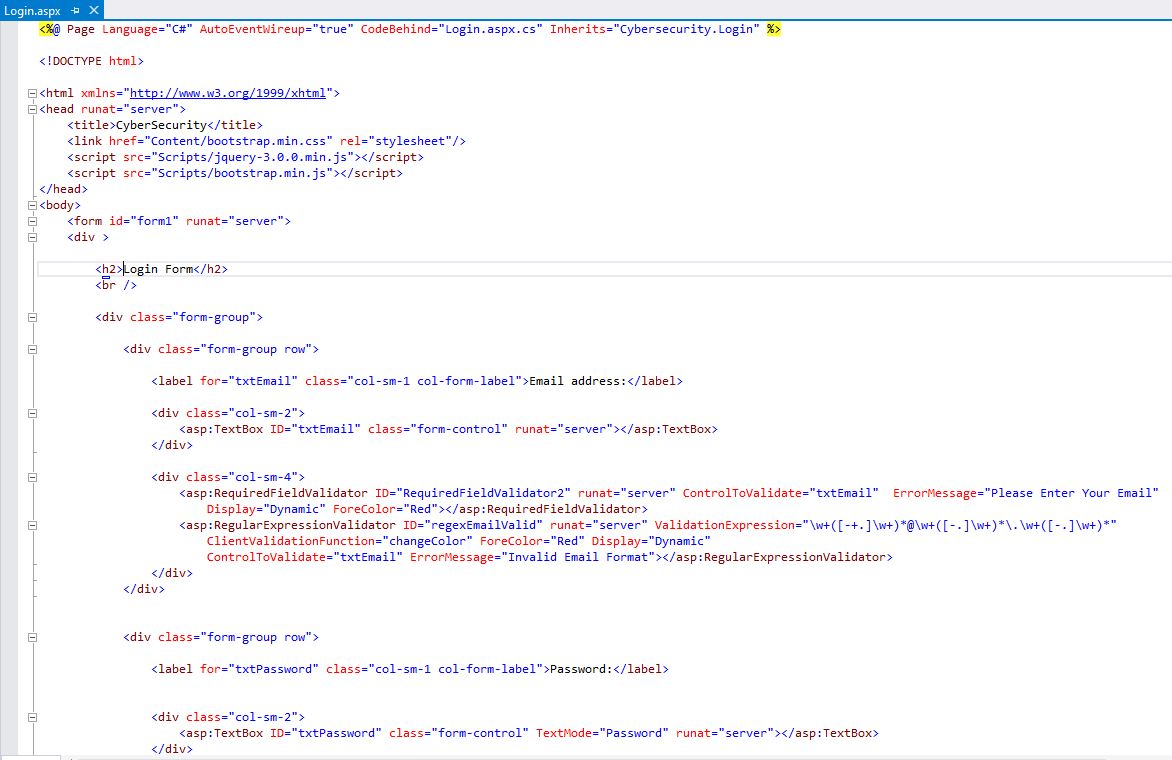
12Fig. Login Form code 2/1 (client side)
Login Form (Login.aspx)
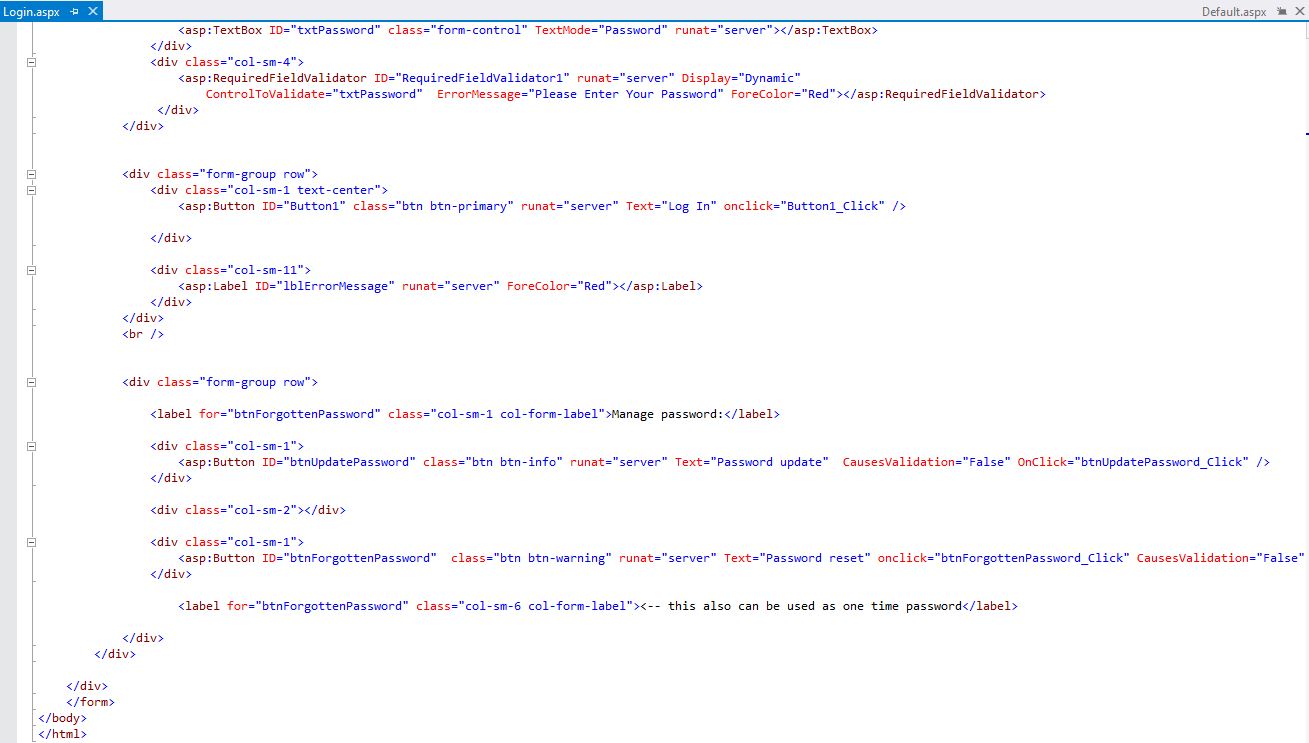
13Fig. Login Form code 2/2 (client side)
Password Update Form (Update.aspx)
On the Password Update form page, you can update your password by entering your email and Current, New, Confirm password. Once this is done, you can log in with the updated password on the Login page.

14Fig. Password Update Page
Password Update Form (Update.aspx.cs) Shows: Check email and password matching, Encrypt old password, Check main password table first
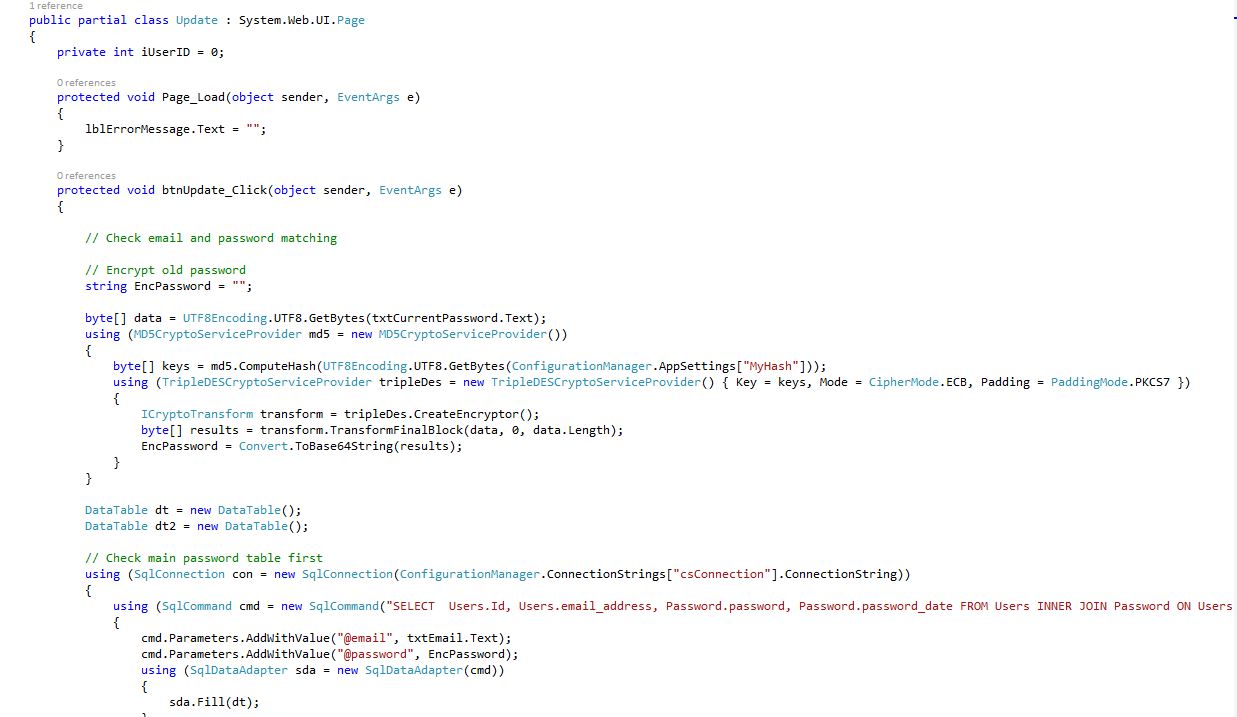
15Fig. Password Update code 4/1 (server side)
Password Update Form (Update.aspx.cs) Shows: Then check temp password table for reset, Main password match, Temp password match, Check password not older than 24h.
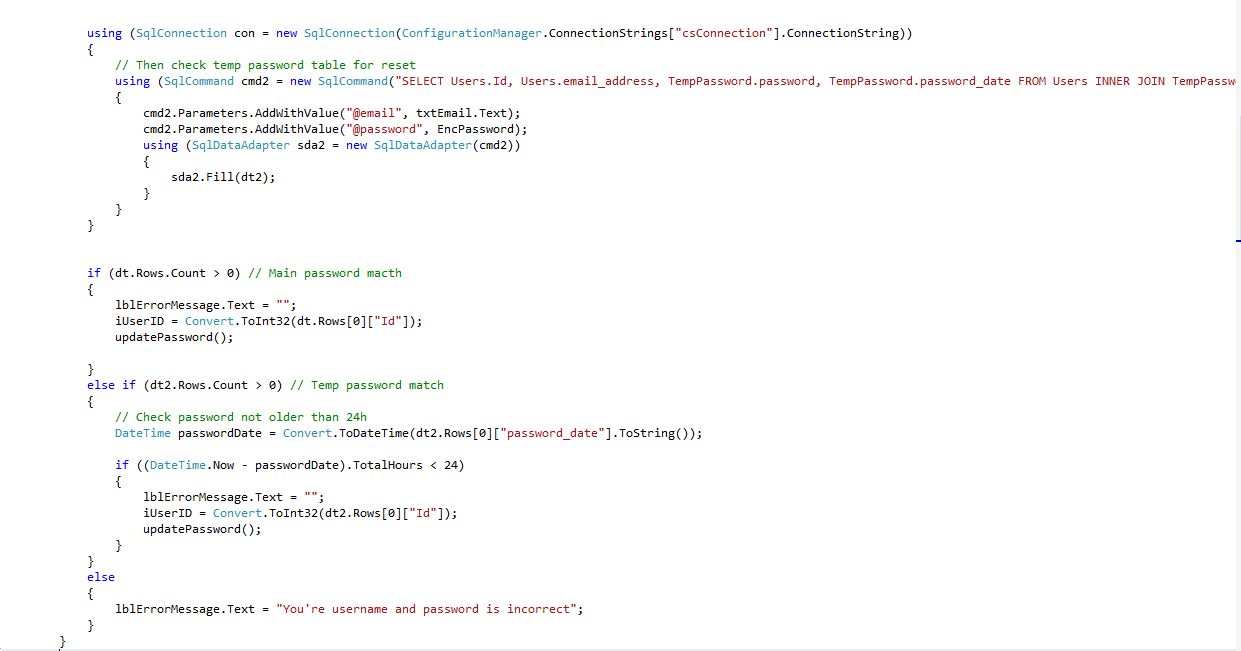
16Fig. Password Update code 4/2 (server side)
Password Update Form (Update.aspx.cs) Shows: Encrypt passwords, Check new password in old password table, it didn't use in last year.
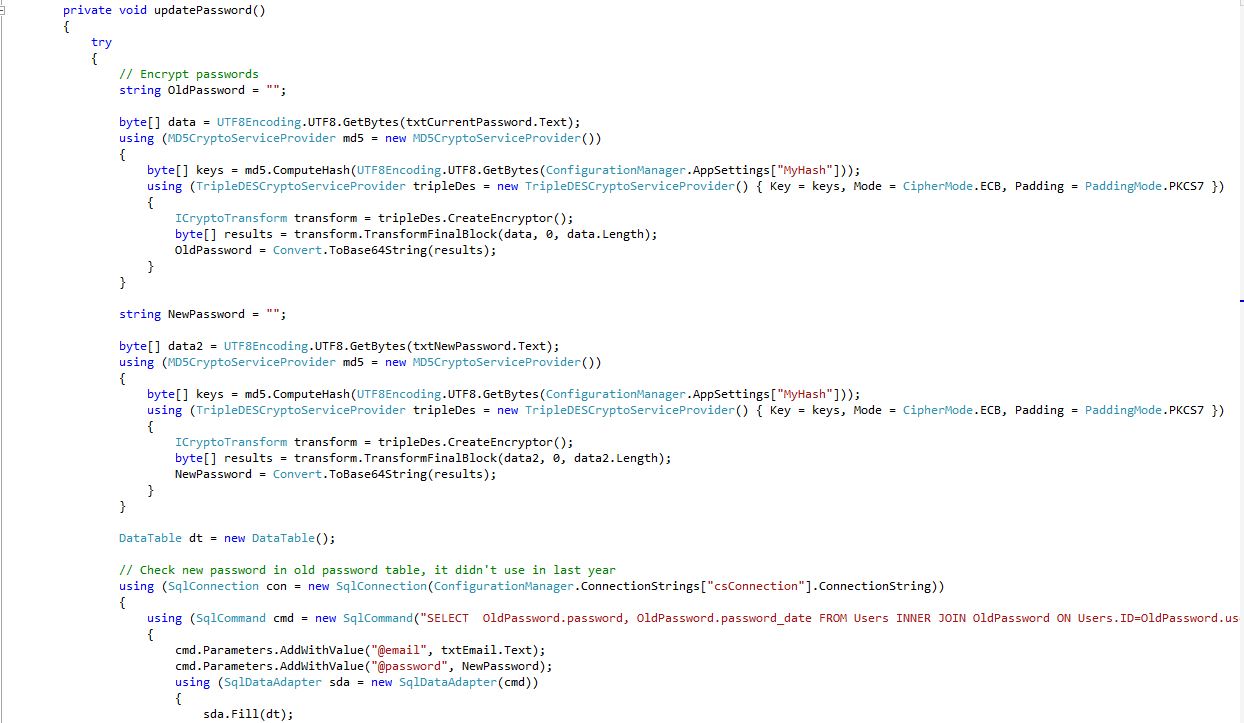
17Fig. Password Update code 4/3 (server side)
Password Update Form (Update.aspx.cs) Shows: Password's been used, Delete current password from main and temp password table, Save old password to old password table but delete all older than 1 year old passwords, Save new password to database, Display dialog and redirect to update page.
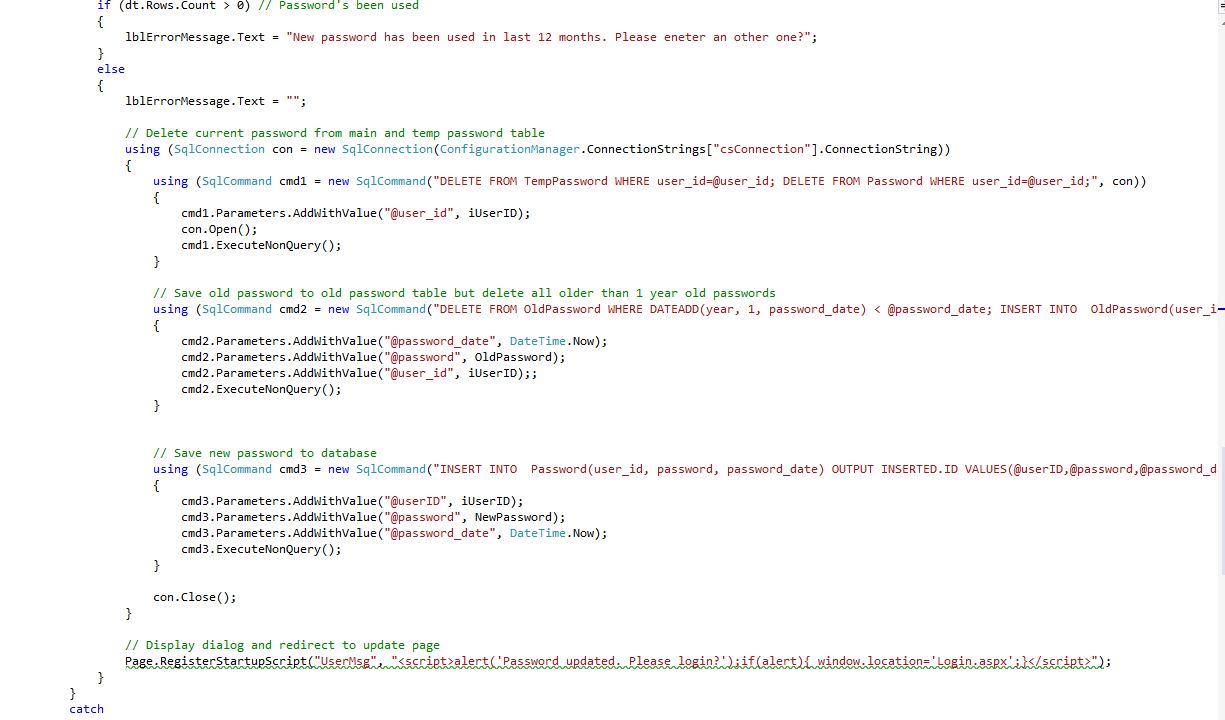

18Fig. Password Update code 4/4 (server side)
Password Update Form (Update.aspx)

19Fig. Password Update Form code 2/1 (client side)
Password Update Form (Update.aspx)

20Fig. Password Update Form code 2/2 (client side)
Reset Form (Reset.aspx)
On the Reset form page, you will receive a generated new password in an email by entering the email address. Once this is done, you can update your password and to access the Redirect page.
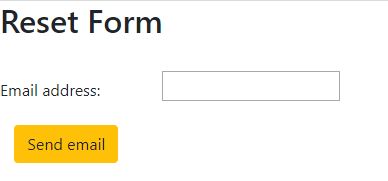
21Fig. Reset Page
Reset Form (Reset.aspx.cs) Shows: Check email is valid and get user ID, Email is valid, Generate a new password end encrypt, Email is valid get Id, Save new password to database, Delete user's previous password and insert new one to temp password table, Email new password to user, Display sent dialog, Display error dialog.
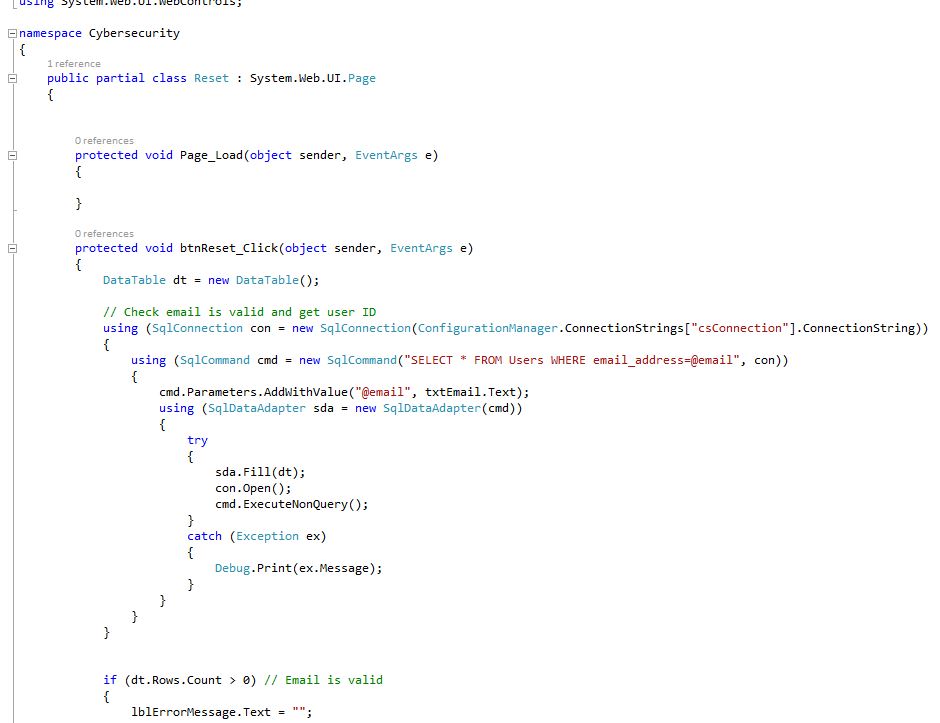
22Fig. Reset Form code 3/1 (server side)
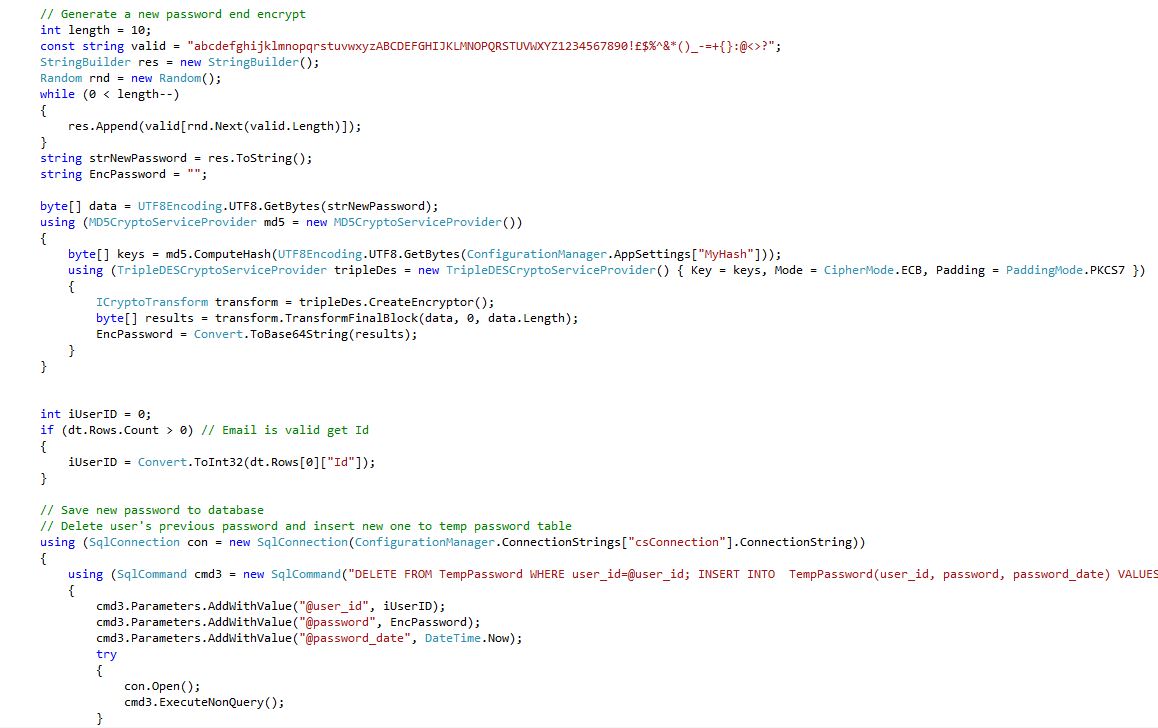
23Fig. Reset Form code 3/2 (server side)
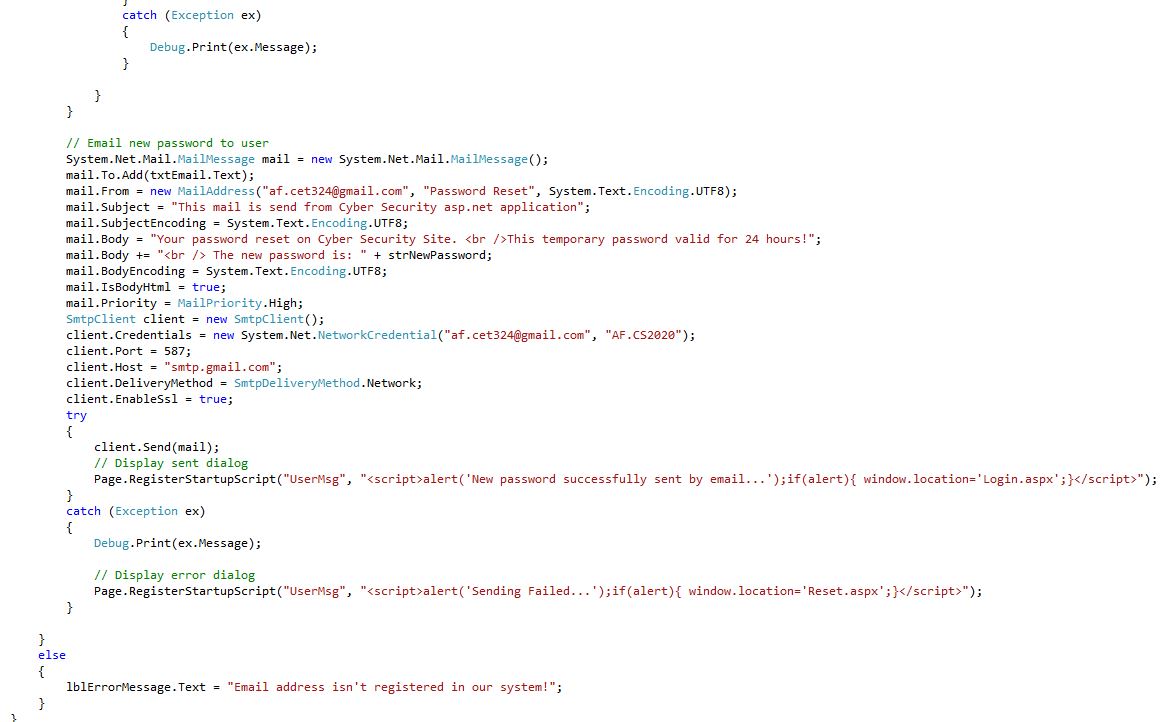
24Fig. Reset Form code 3/3 (server side)
Reset Form (Login.aspx)
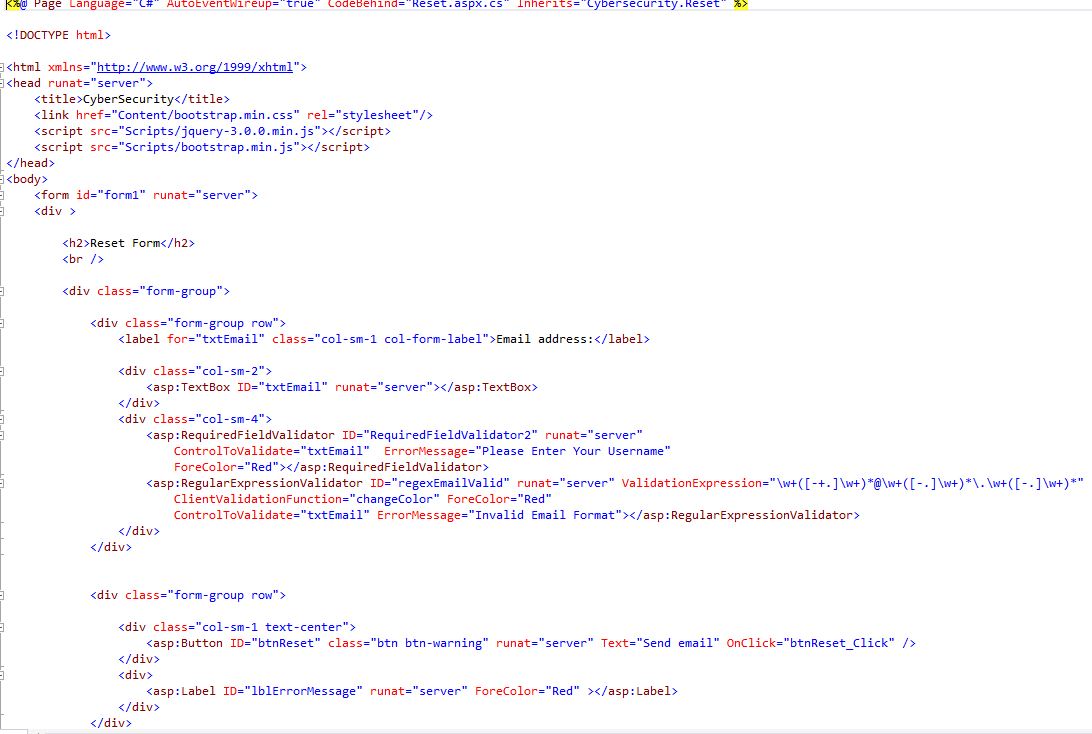
25Fig. Reset Form code (client side)
Redirect page (Redirect.aspx)
You have successfully logged in to the page on the Redirect page and you can log out of the page with the Logout button, which will take you to the Login page.

26Fig. Redirect Page
Redirect page (Redirect.aspx.cs) Shows: User's status saved to session, if someone try to open this site without login, it redirect to Login site. Get user state from session, Redirect user if he's/she's state logged out in session, Set user state to logged out in session.
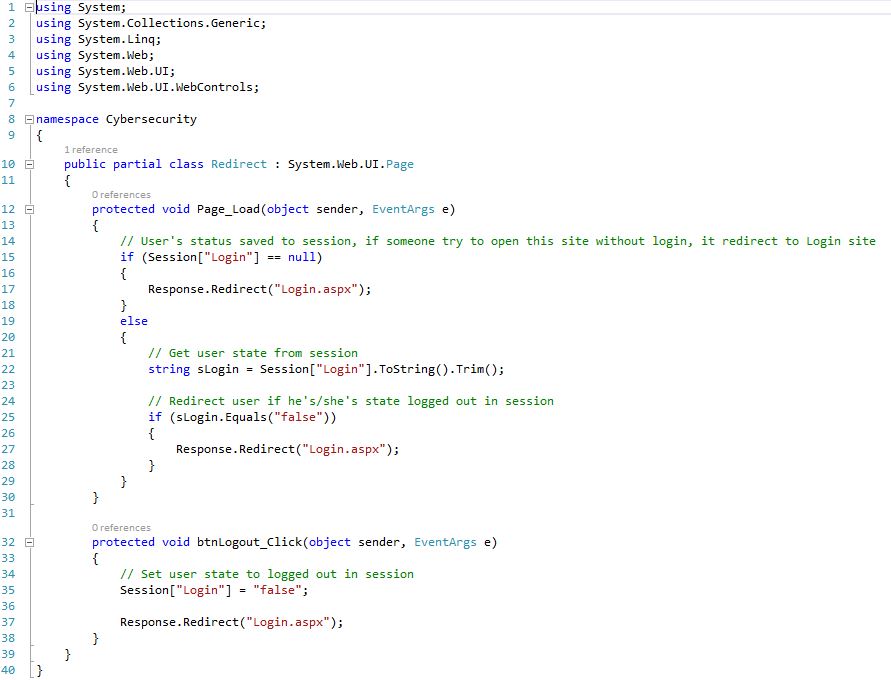
27Fig. Redirect page code (server side)
Redirect page (Redirect.aspx)
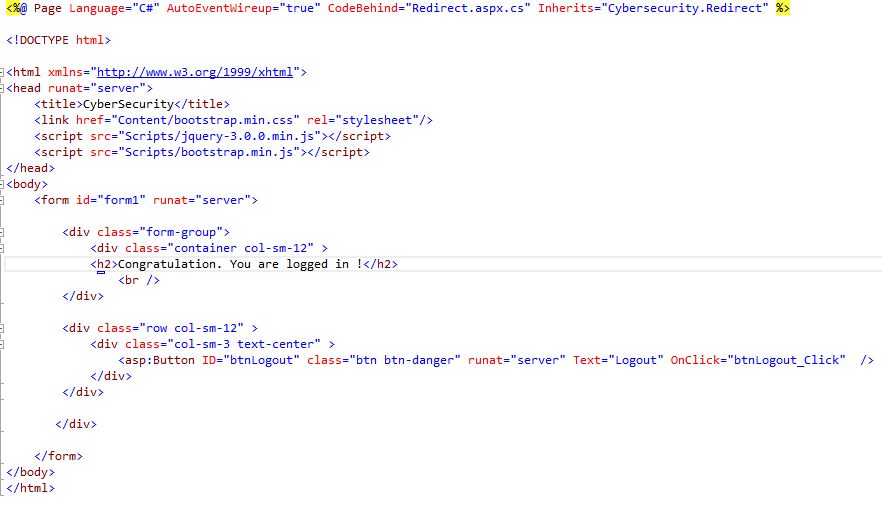
28Fig. Redirect code (client side)
Source Code