CET343 (Android M.D.) PPW1 Task and Submission

- Details
- Category: Level 3, Android Mobile Development
- Published: Thursday, 04 February 2021 15:02
- Hits: 2411
Task
CET343 Android Mobile Development Assignment 1 (2019/20)
This assignment contributes 30% to your final module mark and tests learning outcomes 1, 2 & 3. The assessment has been designed to enable completion within a maximum time frame of 14 hours.
- Advanced understanding of the various methodological approaches to native mobile design, including different programming languages, storage designs and appropriate native mobile standards
- Comparative knowledge of design and development techniques for the design of native mobile applications and storage systems
- Ability to plan, analyse, design, build and implement a media and interaction rich native mobile application in a chosen domain
This assessment is taking place as a Professional Practice Half Week.
Your problem will be issued either at 9am Monday and you will submit by 9am Wednesday, or at 2pm Wednesday and you will submit by 2pm Friday. This means you have 2 working days to complete it. We assume that 2 working days means 7 hours per day (as if you are working a full time job, 9am-5pm with lunch break), and your tutor and moderator have agreed that the task should take no longer than 14 hours.
This assignment is split into two parts. Part A is worth 40 marks and is a design and reporting task which offers you the opportunity to design, discuss and justify your application design. Part B is worth 60 marks and this offers you the opportunity to create some of the main user interfaces or “activities” for an app.
Scenario
uGotThis
You have been commissioned to create an app that will help users manage tasks that they need to complete. This app will allow for the creation and management of tasks as well as extra features such as task delegation and location tracking.
Typical user interactions
David is looking to get a handle on a long list of jobs that he needs to complete in order to organise a surprise birthday party. He searches the play store for “todo list app” and comes across an app called uGotThis. After downloading the app, he is asked to register for an account. Once registered, he logs into the app and asks if he wants to add a task to his list. He adds a task and this appears on the home screen of the app. He can then manage the tasks by editing and deleting them, and marking them as complete. He also notices that he can send tasks to people in his contacts list so he decides to send a task to his sister via SMS who is also helping with the party planning.
You are required to develop a prototype application for the Android operating systems which will include at least all of the core requirements.
Core requirements of the app:
- Home screen - the point of entry for your app.
- User registration
- Manage my tasks
- Delete tasks
- Edit tasks
- Mark as complete
- Create a task
- Task Delegation
- The ability to send a task as an SMS to another phone.
Optional Desirable Requirements for the app:
- The ability to Geotag a task so the location of the task can be recorded and then viewed on a map.
- The ability to attach media to a task such as pictures, videos or audio recordings.
- To include gesture control to improve the management of tasks.
There is no associated logo or house style for this app yet so you have free reign over the appearance.
Part A - Design and Analysis (40 marks)
A short technical report should be submitted. The document should include the following sections:
- Front cover. Include name, userID, registration number and programme.
- Analysis. This section requires you to provide a comparative evaluation of the various methodological approaches to native mobile design, including operating systems, options for different programming languages, storage designs and appropriate native mobile standards. Your comparison should consider iOS and Android based solutions at a minimum.
- Design. This section should show your screen hierarchy, plus wireframe design and menu / layout details. You should critically evaluate how your design matches current android design principles, and summarise the media resources and interaction requirements of your application.
Part B - User Interfaces (60 marks)
A partly completed Android project should also be submitted including the following 4 activities / screens.
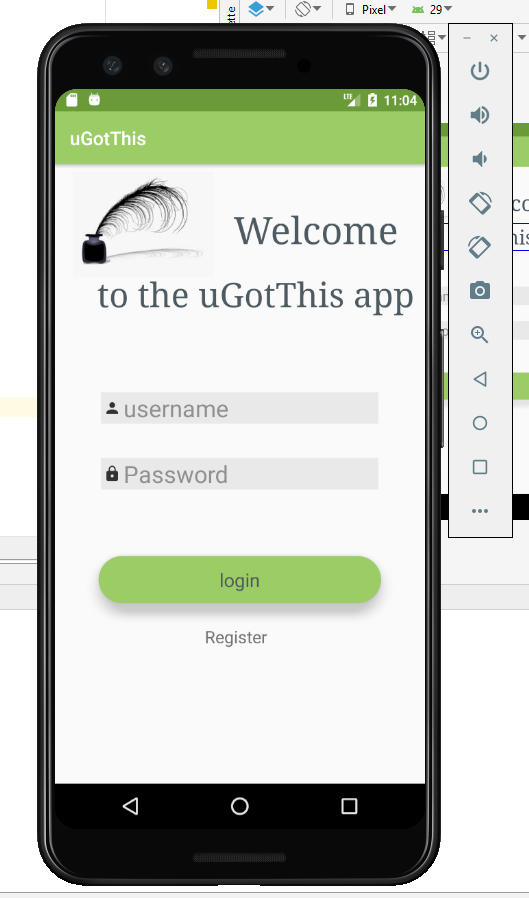
- Home screen
- Register
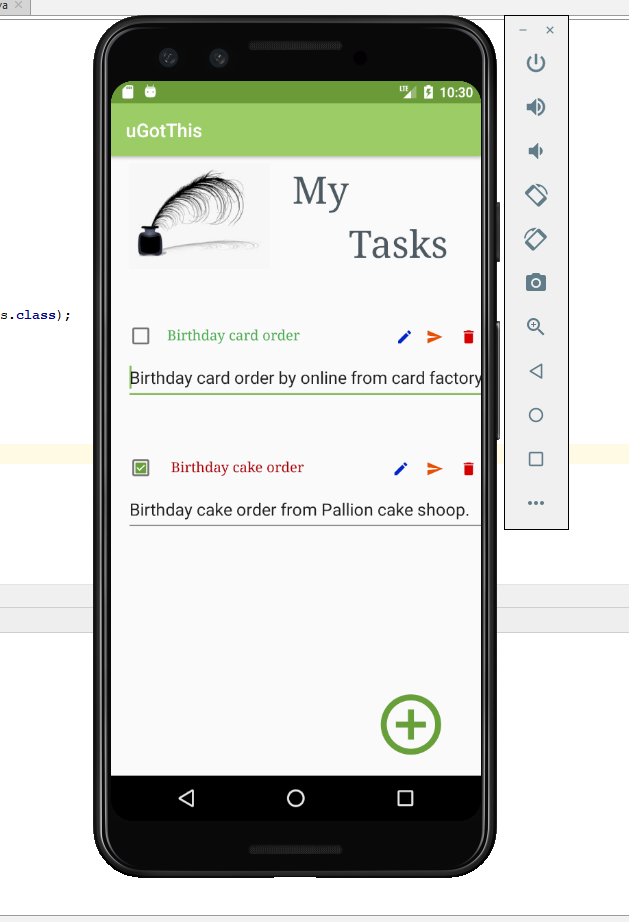
- Task list
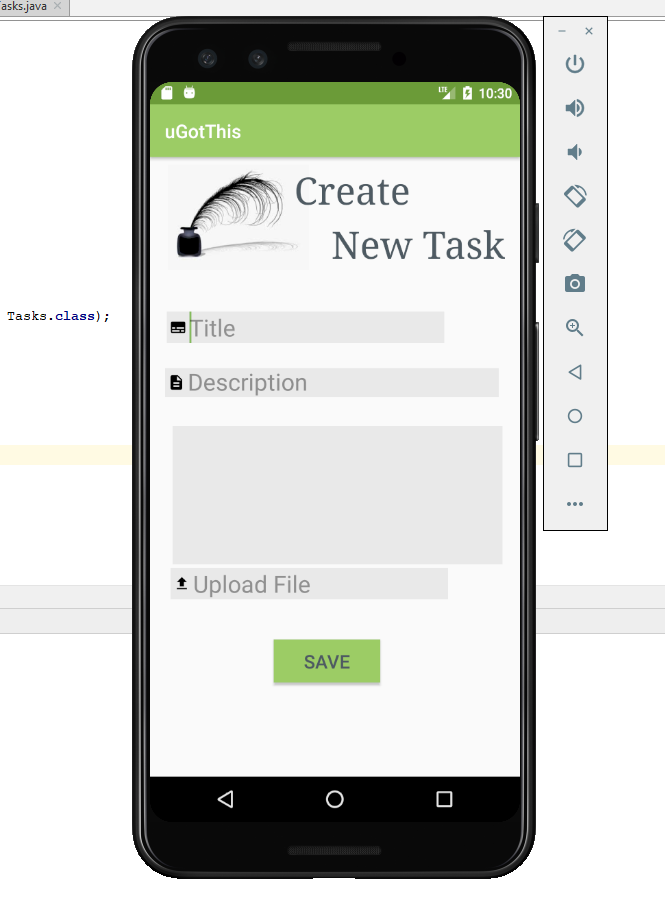
- Create a task
This is not expected to include any real functionality yet and is solely needed to demonstrate the design of your user interfaces. The only thing the app is required to do at present is successfully navigate between activities.
Ensure that your XML mark up is commented appropriately. You are to submit the Android project as a zip file and upload it to canvas as part of your submission.
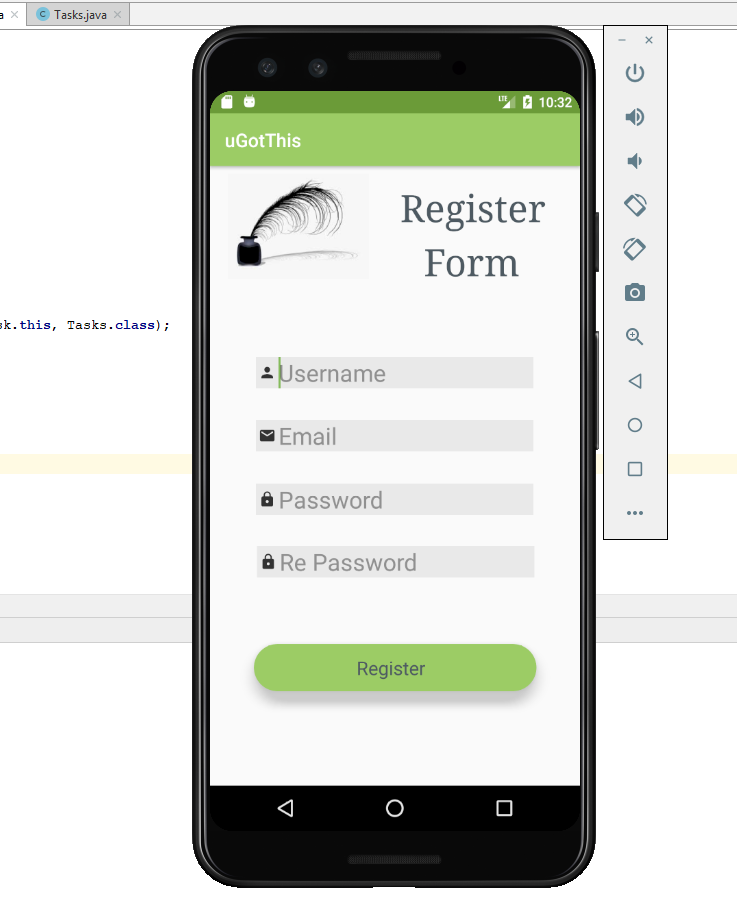
As this app will not demonstrate any real functionality yet, ensure that you include screenshot evidence of how your screens or “activities” look. You can provide evidence generated from your own Android device or from the Android Virtual Device.
Submission
The deadline for submission is the 6th of November 2019 at 9am. This excludes anyone who has a support memo and may be entitled to extra time.
Please submit 2 documents (word of pdf for the report, zip for the android project) to the assignments section on canvas.
Marking Criteria
Part A
Analysis (15 Marks)
Full marks will be awarded for a clear, detailed and accurate analysis and evaluation of the various methods and approaches to native app development.
Design (15 Marks)
Full marks will be awarded for a full collection of wireframe designs that follow current app design standards and follow current trends in application design. User interaction needs to be fully considered to ensure a good user experience and marks will reflect this. A detailed critical evaluation of your design and how it matches current design principles must be included to achieve full marks for this section.
Presentation and referencing (10 marks)
Full marks for this section will be awarded for a professional report including a front cover and accurate referencing.
Part B
Prototype App (12 marks for each screen / activity - maximum 48 marks)
Full marks for each screen / activity will be awarded if the activity is designed well and constructed with correct XML mark up.
Screenshot evidence and commenting (12 marks)
Full marks will be awarded if you provide sufficient screenshot evidence of the app working on an Android Virtual Device or your own Android Device. All XML code needs to be sufficiently commented as well.
Marking Grid
|
Analysis |
11-15 marks A fully comprehensive accurate analysis and evaluation that includes the various methods and approaches to native app development. |
5-10 marks A good analysis and evaluation of the methods and approaches to native app development. This may be lacking in detail and critical evaluation. |
0-4 marks A poor analysis of current methods and approaches to app development. This may be significantly lacking in detail and critical evaluation. |
|
Design |
11-15 marks A full collection of wireframe designs that follow current material design guidelines and current trends in app design, complete with a detailed critical evaluation of how your design meets these guidelines. |
5-10 marks A full collection of wireframe designs that partially conform to material design guidelines. Your critical evaluation might be lacking in detail and justification. |
0-4 marks Partially completed wireframe designs with an evaluation that falls significantly short of what is required. |
|
Presentation and referencing |
7-12 marks Professional presentation including contents page and front cover with accurate referencing |
3-6 marks Presentation of the document might be lacking professionalism and references might not be accurate |
0-2 marks Presentation of the document is poor and no references are included |
|
Prototype app |
|||
|
Home screen
|
8 - 12 marks Correct XML markup used and conforms to material design guidelines |
4 - 7 marks Layouts and view objects might not conform to material design guidelines and XML might be incomplete |
0 - 3 marks Poorly constructed activity that does not conform to material design guidelines with incorrect XML markup |
|
Register |
8 - 12 marks Correct XML markup used and conforms to material design guidelines |
4 - 7 marks Layouts and view objects might not conform to material design guidelines and XML might be incomplete |
0 - 3 marks Poorly constructed activity that does not conform to material design guidelines with incorrect XML markup |
|
Task list |
8 - 12 marks Correct XML markup used and conforms to material design guidelines |
4 - 7 marks Layouts and view objects might not conform to material design guidelines and XML might be incomplete |
0 - 3 marks Poorly constructed activity that does not conform to material design guidelines with incorrect XML markup |
|
Create task |
8 - 12 marks Correct XML markup used and conforms to material design guidelines |
4 - 7 marks Layouts and view objects might not conform to material design guidelines and XML might be incomplete |
0 - 3 marks Poorly constructed activity that does not conform to material design guidelines with incorrect XML markup |
|
Screenshot evidence and commenting |
7 - 12 marks Screenshots of the activities are included and the activities are commented professionally |
0 - 6 marks Some screenshots might be incomplete and comments might be lacking |
N/A |
Submission
uGotThisTechnical Report
University of Sunderland
Faculty of Technology
Department of Computer Science
CET343 Android Mobile Development:
uGotThisTechnical Report
Student Name: Andrea Eva Frankone Balazs
Registration Number:
Programme: BSc (Hons) Web and Mobile Development
Analysis
Native mobile design
Native mobile applications for iOS and Android have special operating system-specific features. Guidelines by Apple and Google recommend using platform-standard navigation controls whenever possible: page controls, tab bars, segmented controls, table views, collection views, and split views.
Differences in navigation patterns there’s a universal navigation bar at the bottom of Android devices. Using the back button in the navigation bar is an easy way to go back to the previous screen or step. On the other hand, the Apple design approach is quite different. There’s no global navigation bar, so we can’t move back using a global back button in native iOS app design. Internal screens should have a native navigation bar with a back button in the top left corner. Apple also includes a left-to-right swiping gesture in applications to will return you to the previous screen. The same gesture on Android devices will switch tabs. But in contradistinction to iOS, there is a bottom navigation bar on Android devices with the back button which will return you to the previous screen.
In-app navigation patterns one well-known navigation pattern used in Android applications is a combination of a navigation drawer and tabs. A navigation drawer is a menu that slides in from the left or right by pressing the hamburger menu icon. Tabs are located right below the screen title and enable content organization at a high level, allowing the user to switch between views, data sets, and functional aspects of an app. In the Apple there’s no standard navigation control that’s similar to the drawer navigation menu. Apple’s putting global navigation in a tab bar. The tab bar appears at the bottom of the app screen and provides the ability to quickly switch between main sections of an app.
Button styles in iOS and Android, floating action buttons on Android and call to action buttons on iOS. A floating action button represents the primary action in an application. The analogous design for the primary action in iOS apps is call to action button, which is located in the centre of the tab bar. Android Floating action buttons (or FAB) are: They are distinguished by a circled icon floating above the UI and have special motion behaviours, related to morphing, launching, and its transferring anchor point.
Differences between native bottom sheets in Android and action sheets & activity views in iOS. The same content can be found in native iOS action pages and activity views as in Android, but these components look different. There are two types of bottom sheets in Android: modal bottom sheets and persistent bottom sheets. Modal bottom sheets have two types of content: modal bottom sheets with different actions and an app list that appears after the user taps the Share icon.
Differences in touch targets and grids iOS and Android have slightly different guidelines for touch targets (44px @1x for iOS and 48dp/48px @1x for Android). Material Design layouts encourage consistency across platforms, environments, and screen sizes by using uniform elements and spacing. UIs should use intuitive and predictable layouts, with consistent UI regions and spatial organization. Layouts should use a consistent grid, keylines, and padding. Layouts are adaptive and react to input from the user, device, and screen elements. Material Design layouts are visually balanced. Most measurements align to an 8dp grid applied, which aligns both spacing and the overall layout. Smaller components, such as iconography and typography, can align to a 4dp grid.
Typography differences. Both systems recommend using their own system fonts – Roboto for Android and San Francisco for iOS. Noto is the standard typeface for all languages in Chrome and Android that aren’t supported by Roboto. The basic sizes of the text are similar, but Material Design uses a larger difference in font sizes and their layout, while iOS builds the text hierarchy mainly by using bold type. Medium. (2018).
Operating systems
Target Audiences
According to 2019 Surveyors, the most popular mobile operating system is Android with 76.24% compared to ios’ 22.48%. StatCounter Global Stats. (2019).
Google’s Android or Apple’s iOS. These two platforms accounted for 99.7% of all new smartphones shipped in 2017, according to IDC, and that percentage rose even higher last year. Affordability: Apple has always been at the high end of the market in terms of pricing. For sheer scale and variety, nothing competes with Android. Samsung’s Galaxy Note line almost match Apple’s iPhone pricing, but there’s also a huge choice of good, low-cost handsets from a wide variety of different manufacturers, and the platform has been deliberately optimized to run on low-end hardware. The fact that Android also leads the field in free apps makes it the natural choice for the budget-conscious. Hill, S. (2019).
Programming Languages
Android app the most common language used is Java is the official language of Android development and is supported by Android Studio. Recently Kotlin was added as an official Android language being compatible with the other ones. Android Studio also supports C with the use of the Java NDK. This allows for native coding applications, which can be handy for things like games. C++ is more complicated though. C# is a slightly more beginner-friendly alternative to C or C++ that obfuscates more code. It’s supported by some very handy tools like Unity and Xamarin which are great for game development and for cross-platform development. While iOS programmers were using Objective–C, Apple introduced Swift in 2014 as the official language for iOS apps. It is not hard to learn its syntax and the advantage is that is built for this main purpose, for helping developers to build mobile apps that run on Apple devices. It also iOS uses C #, Python, c ++ and HTML5 programming language too. Development, 1. (2019). Android Authority. (2019). Chand, M. (2019).
Development Tools
We can also talk about development tools for differences between iOS and android. The environment used for Android development was Eclipse at the beginning, but with the launch of Android Studio created by Google, the support for Eclipse ended so all developers who want to build Android apps are using Android Studio. Android has its own open development platform which also supports many third-party apps and tools, which is a wonderful thing for developers as they can try out many features and add more functionality to their apps. For iOS apps you will use XCode, “the centre of the Apple development experience”. After deciding on the programming language you will need to get used with the tool that will help you to create the wanted application. Apple also provides a development platform along with a limited set of tools, but developers cannot use any external tool for development, which makes it harder for them to experiment new things. Development, 1. (2019). SAG IPL - A Technology Blog. (2019).
Security
IOs wins in the security department, they send out occasional security updates and security threats are rare, because iOS is locked and downloading out of the App Store is complicated, this however can be viewed as restricting to some extent. Android has monthly security updates, but manufacturers tend to lag behind in pushing out these updates so at any given time a vast majority of Android devices are running outdated OS software. Diffen.com. (2019).
Storage
Cloud Services in Android there is a native integration with Google Drive storage. 15GB free, $2/mo for 100GB, 1TB for $10. Apps available for Amazon Photos, OneDrive and Dropbox. On the other hand, iOS has a native integration with iCloud. 5GB free, 50GB for $1/mo, 200GB for $3/mo, 1TB for $10/mo. Apps available for Google Drive and Google Photos, Amazon Photos, OneDrive and Dropbox. Diffen.com. (2019).
Design
My initial design follows the android principle that it should be kept brief, seeing as it will be an app for tasks and managing we want the user to have a quick experience, but a good one. It is easy to navigate and know where you are as the pages are titled and state where you are and what you are looking at. It is also very consistent with navigation and design style so that the user never gets lost or wastes time finding where things are, the layout is very quick and simple for the user to use.
We are also making the important things fast, so managing their tasks and creating their tasks is fast and simple, it is also a simple design as to how to create a task, just a title, description and they have the option to attach a file or upload something.
I will be taking advantage of the full screen of the mobile, I will be using icons to make the navigation of the application a lot quicker and easier. My design will be somewhat colourful, when a task is completed and it is indicated by the tick it will change colours.


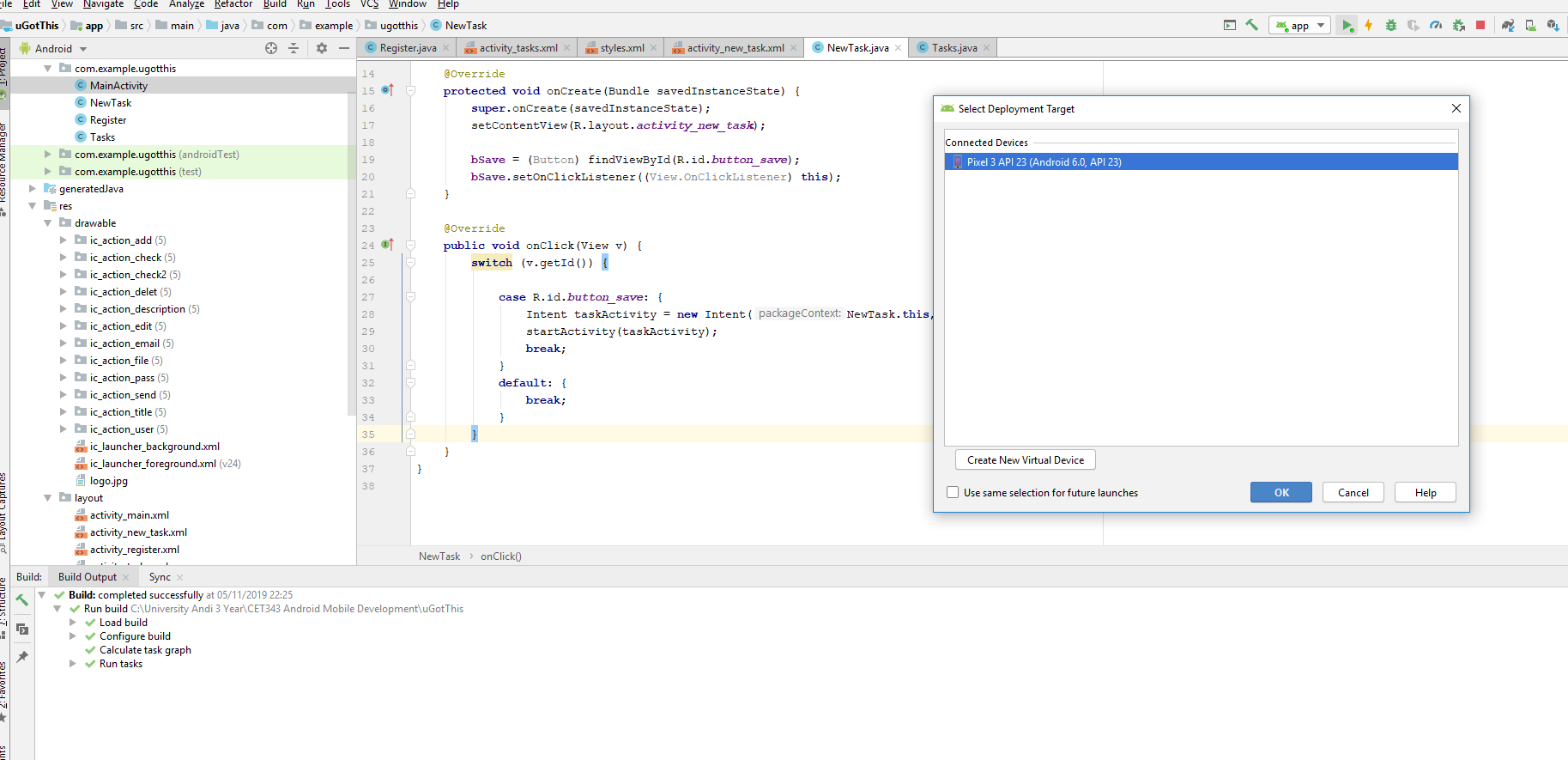
Screenshot Evidence
References
Android Authority. (2019). I want to develop Android Apps — What languages should I learn?. [online] Available at: https://www.androidauthority.com/develop-android-apps-languages-learn-391008/ [Accessed 4 Nov. 2019].
Chand, M. (2019). Best Programming Language for iOS App Development. [online] C-sharpcorner.com. Available at: https://www.c-sharpcorner.com/article/best-programming-language-for-ios-app-development/ [Accessed 4 Nov. 2019].
Development, 1. (2019). 7 Major Differences Between iOS And Android Development. [online] Appsamurai.com. Available at: https://appsamurai.com/7-major-differences-between-ios-and-android-development/ [Accessed 4 Nov. 2019].
Diffen.com. (2019). Android vs iOS - Difference and Comparison | Diffen. [online] Available at: https://www.diffen.com/difference/Android_vs_iOS [Accessed 4 Nov. 2019].
Hill, S. (2019). Android vs. iOS: In-Depth Comparison of the Best Smartphone Platforms | Digital Trends. [online] Digital Trends. Available at: https://www.digitaltrends.com/mobile/android-vs-ios/ [Accessed 4 Nov. 2019].
Medium. (2018). Differences between Designing Native iOS Apps and Native Android Apps. [online] Available at: https://medium.muz.li/differences-between-designing-native-ios-apps-and-native-android-apps-e71256dfa1ca [Accessed 4 Nov. 2019].
SAG IPL - A Technology Blog. (2019). Android Vs. iOS. [online] Available at: https://blog.sagipl.com/android-vs-ios-development/ [Accessed 4 Nov. 2019].
StatCounter Global Stats. (2019). Mobile Operating System Market Share Worldwide | StatCounter Global Stats. [online] Available at: https://gs.statcounter.com/os-market-share/mobile/worldwide [Accessed 4 Nov. 2019].
Code